Free v1.0.0 ~12 MB

WINK HLS Stats

HLS stream analyzer that tells you what's wrong and how to fix it. Cache issues, keyframe alignment, CDN behavior, ABR selection - with specific, actionable recommendations.

Download Quick Start
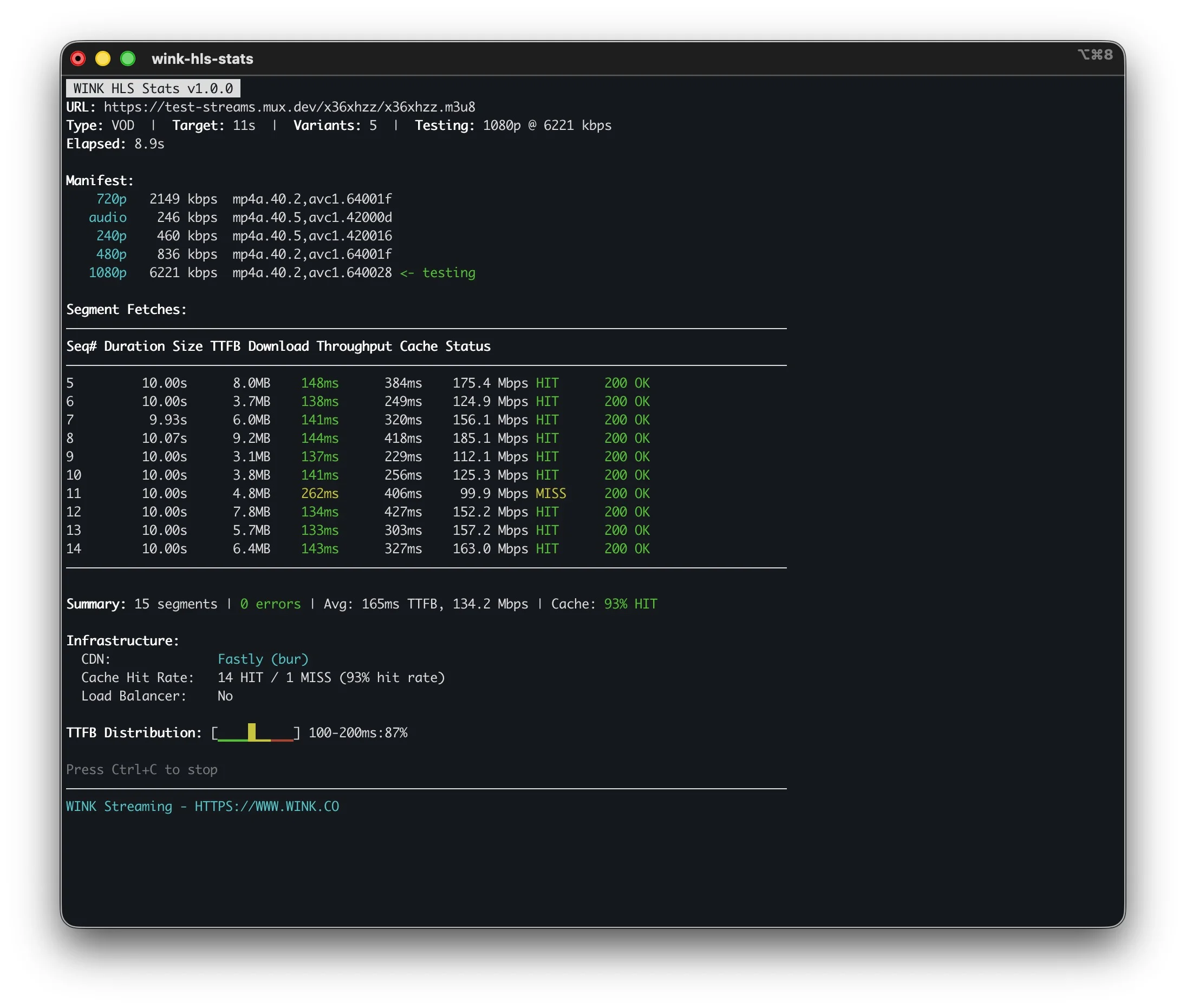
WINK HLS Stats

curl

Downloads segments. You get files, but zero insight into delivery quality.

ffprobe

Reads metadata. Tells you the codec, not if your CDN is actually caching.

HLS Stats

Measures delivery truth. TTFB, cache hits, P95 throughput. Plus how to fix issues.

See It In Action

Actionable Recommendations

Don't just see problems - understand exactly how to fix them

Cache Configuration

Cache Warnings:
  ! 0% cache hit rate - check cache key configuration or TTL

Know immediately when CDN caching isn't working, with specific guidance on Cache-Control headers, TTL settings, and Vary header issues.

Keyframe Alignment

Playlist Warnings:
  ! 5 segment(s) don't start with keyframe

Catch slow channel change issues before viewers complain about black frames. Get encoder GOP configuration recommendations.

ABR Variant Selection

ABR Simulation:
  Recommended:    1080p @ 4712 kbps
  Safe Fallback:  720p @ 2493 kbps (p95)

Risk assessment based on P95 throughput (worst 5%), not averages that hide problems. Know which variants may rebuffer.

Live Latency

Live Stream:
  Est. Live Latency: 18.2s
  Segments Behind:   3

The first question everyone asks: "What's my latency?" Glass-to-glass estimation using EXT-X-PROGRAM-DATE-TIME.

Quick Start

# Analyze with container parsing for keyframe detection
$ wink-hls-stats analyze https://cdn.example.com/stream.m3u8 --parse-segments

# Quick manifest inspection
$ wink-hls-stats manifest https://cdn.example.com/master.m3u8

# Monitor live stream with latency estimation
$ wink-hls-stats monitor https://live.example.com/stream.m3u8 --duration 5m

# Compare origin vs CDN performance
$ wink-hls-stats compare https://origin/s.m3u8 https://cdn/s.m3u8

# CI/CD quality gate
$ wink-hls-stats analyze https://staging/stream.m3u8 --error-threshold 1 --output json

Metrics Collected

HTTP-level analysis without video decoding. Minimal CPU usage.

TTFB Time to First Byte
P50 / P95 Throughput
HIT / MISS Cache Rate
CDN Provider & Edge
Keyframe Alignment Check
Duration EXTINF Drift
Errors 4xx / 5xx / Timeout
Latency Live Estimate

Command Line Options

Flag Default Description
--output, -oconsoleOutput format: console or json
--segments, -n10Number of segments to fetch
--variant, -v-1Variant index: -1 = highest, 0 = lowest
--parse-segmentsfalseParse TS/fMP4 for keyframe detection
--duration, -d30sMaximum analysis duration
--error-threshold0Exit code 2 if error rate > n%
--latency-threshold0Exit code 3 if TTFB > n ms
--throughput-threshold0Exit code 4 if throughput < n kbps
--header, -H-Custom HTTP header (repeatable)
--insecure, -kfalseSkip TLS certificate verification

Exit Codes for CI/CD

Gate deployments based on stream quality thresholds

0
Success
1
General Error
2
Error Threshold
3
Latency Threshold
4
Throughput Threshold
5
Manifest Failed
6
No Segments

Download

v1.0.0 - Single binary, no dependencies

Free for personal and non-commercial use. Contact us for commercial licensing.

Windows

x64 ARM64
x64 (12 MB) ARM64 (12 MB)

macOS

Apple Silicon Intel
Apple Silicon (12 MB) Intel (12 MB)

Linux

x64 ARM64
x64 (12 MB) ARM64 (12 MB)

On macOS/Linux: chmod +x wink-hls-stats-*

CDN Detection

Automatically detects CDN provider, cache status, and edge location

Cloudflare CloudFront Akamai Fastly Azure CDN Google Cloud CDN Verizon Limelight StackPath KeyCDN Bunny CDN

FAQ

What is this for?

Analyzing HLS stream delivery at the HTTP level. See TTFB, throughput, cache behavior, and get recommendations to fix issues.

Does it decode video?

No. It parses TS/fMP4 headers for keyframe detection but doesn't decode video. Minimal CPU usage.

What's P95 throughput?

Your worst 5% of requests. Averages hide problems. P95 shows real-world worst-case performance.

Live latency estimation?

Uses EXT-X-PROGRAM-DATE-TIME to estimate glass-to-glass latency. Shows segments behind live edge.

Compare command?

Analyzes two streams side by side. Great for origin vs CDN or evaluating CDN providers.

Custom headers?

Use -H "Authorization: Bearer ..." for authenticated streams. Can repeat for multiple headers.

JSON output?

Use --output json for machine-readable output. Perfect for automation and log aggregation.

Companion to RTSP Stats?

Yes. HLS Stats analyzes delivery/CDN. RTSP Stats analyzes ingest/cameras. Together: full visibility.