WINK RTSP Stats
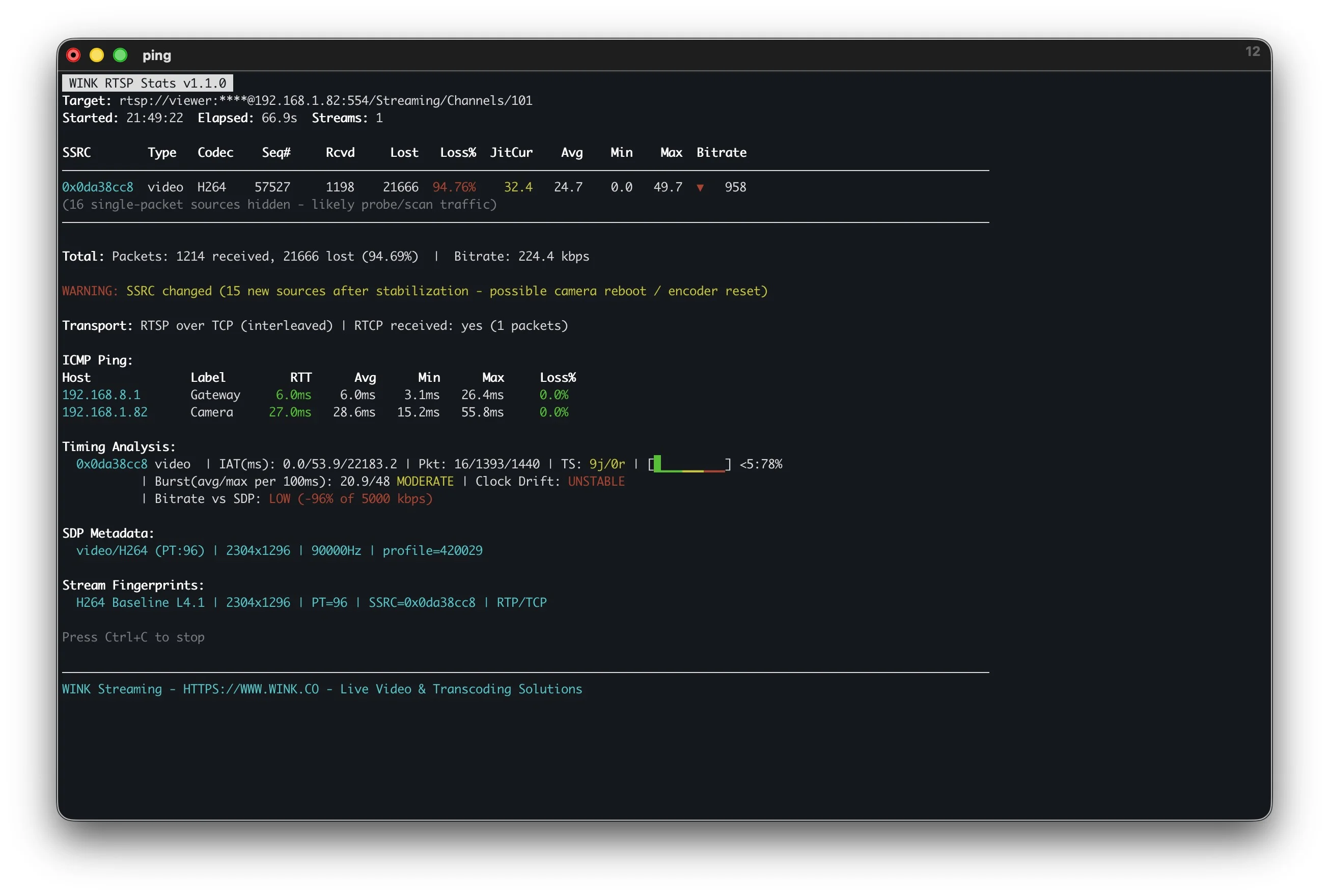
v1.1.0 - February 2026Protocol-level RTSP/RTP stream analyzer that measures quality without decoding video. Connect to any IP camera or media server to diagnose network-level issues affecting video quality. Designed for pre-deployment validation, continuous monitoring, and automated CI/CD quality gates.
- Packet Loss Detection - RTP sequence gap analysis with severity classification
- Jitter Measurement - RFC 3550 compliant inter-arrival time variance calculation
- Clock Drift Analysis - Identifies cameras with unstable RTP timestamps
- Stream Fingerprinting - Codec, profile, resolution, and transport identification
- Quality Gates - Threshold-based exit codes for CI/CD pipeline integration
Windows, macOS, Linux - Single binary, ~5 MB
WINK HLS Stats
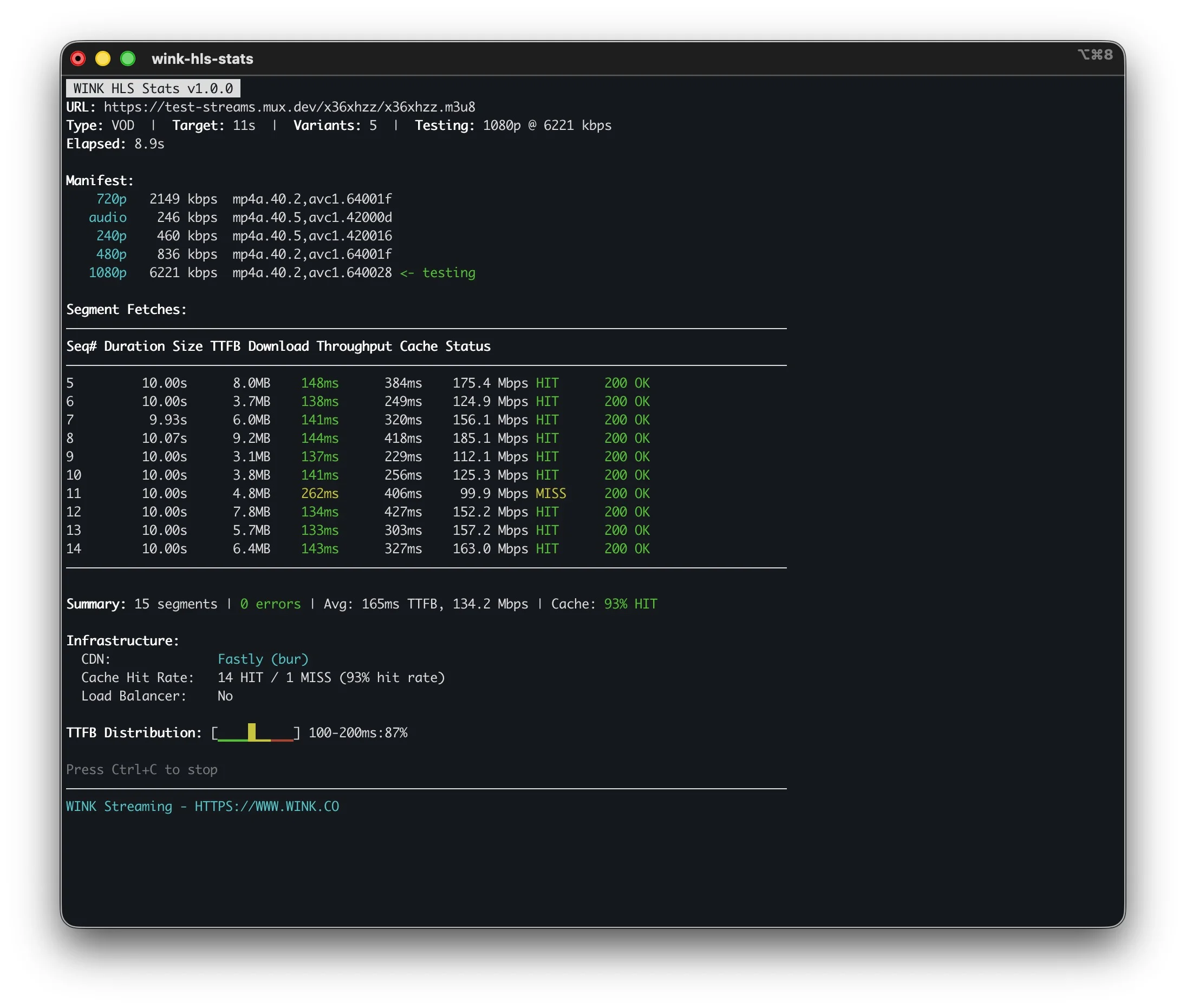
v1.0.0 - February 2026HLS stream analyzer that goes beyond metrics to provide actionable recommendations. Measures HTTP-level delivery quality and identifies specific configuration issues affecting playback. Particularly useful for CDN troubleshooting, cache optimization, and ABR ladder validation.
- Cache Performance - HIT/MISS tracking with configuration recommendations
- Throughput Analysis - P50/P95 measurements that reveal worst-case performance
- Keyframe Alignment - Detects segments that cause slow channel switching
- CDN Detection - Identifies provider, edge location, and caching behavior
- ABR Simulation - Risk assessment for variant selection based on actual throughput
Windows, macOS, Linux - Single binary, ~12 MB
Complete Streaming Visibility
RTSP Stats analyzes ingest quality from cameras. HLS Stats analyzes delivery quality to viewers. RTP Dump provides deep packet-level analysis with jitter buffering. Together they provide end-to-end visibility into your streaming infrastructure.
All These Features Built Into WINK Forge
These CLI tools are great for quick diagnostics. For production deployments, WINK Forge and Media Router include all this functionality with a web UI, real-time dashboards, transcoding, and multi-protocol broadcasting.
WINK RTP Dump
v1.0.0 - June 2023Modern RTP/RTCP analysis toolkit inspired by Columbia University's rtptools, rebuilt from the ground up in Go. Features industrial-strength jitter buffering that fixes streams with 5%+ packet reordering. Pipe to ffmpeg, relay with reordering, record to PCAPNG.
- Jitter Buffer - Per-SSRC packet reordering with configurable latency (50-1000ms)
- Multi-SSRC Tracking - Independent stats for each synchronization source
- 6 Commands - inspect, pipe, record, replay, relay, sdp
- RFC 8285 Extensions - Parse abs-send-time, transport-cc, audio-level, mid, rid
- CI/CD Integration - Threshold-based exit codes for automated validation
$ wink-rtpdump inspect udp://0.0.0.0:5004
SSRC PT bitrate loss% jitter
0x12345678 96 4.2 Mbps 0.02 2.3ms
0xABCDEF01 111 128 kbps 0.00 0.8ms
$ wink-rtpdump relay ... --jitter-buffer 300
Reordering packets...
Windows, macOS, Linux - Single binary, ~5 MB
WINK Camera Studio
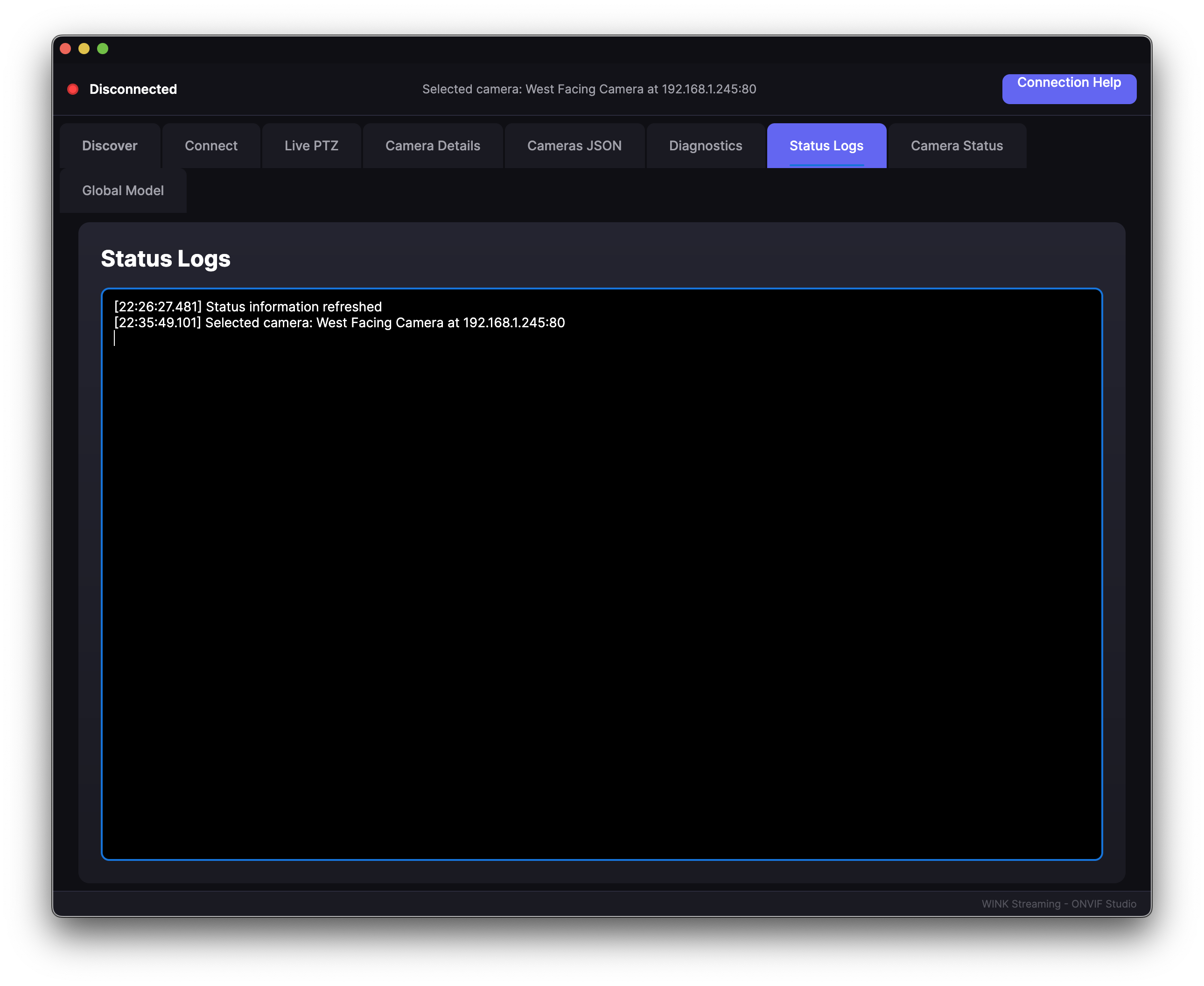
v1.2.0 - Auto-UpdateProfessional camera management software for ONVIF-compatible IP cameras. Provides a unified interface for camera configuration, live viewing, PTZ control, and local recording. Built for integrators and security professionals who need reliable camera access without VMS overhead.
- ONVIF Profiles S/T/G - Full protocol support for streaming, PTZ, and analytics
- PTZ Control - Pan, tilt, zoom with preset management and tours
- Local Recording - Direct-to-disk capture without transcoding
- Event Monitoring - Motion detection and camera event handling
- Multi-Camera Views - Configurable grid layouts for simultaneous monitoring
Windows, macOS, Linux - ~55 MB with auto-updates
WINK SADP Probe
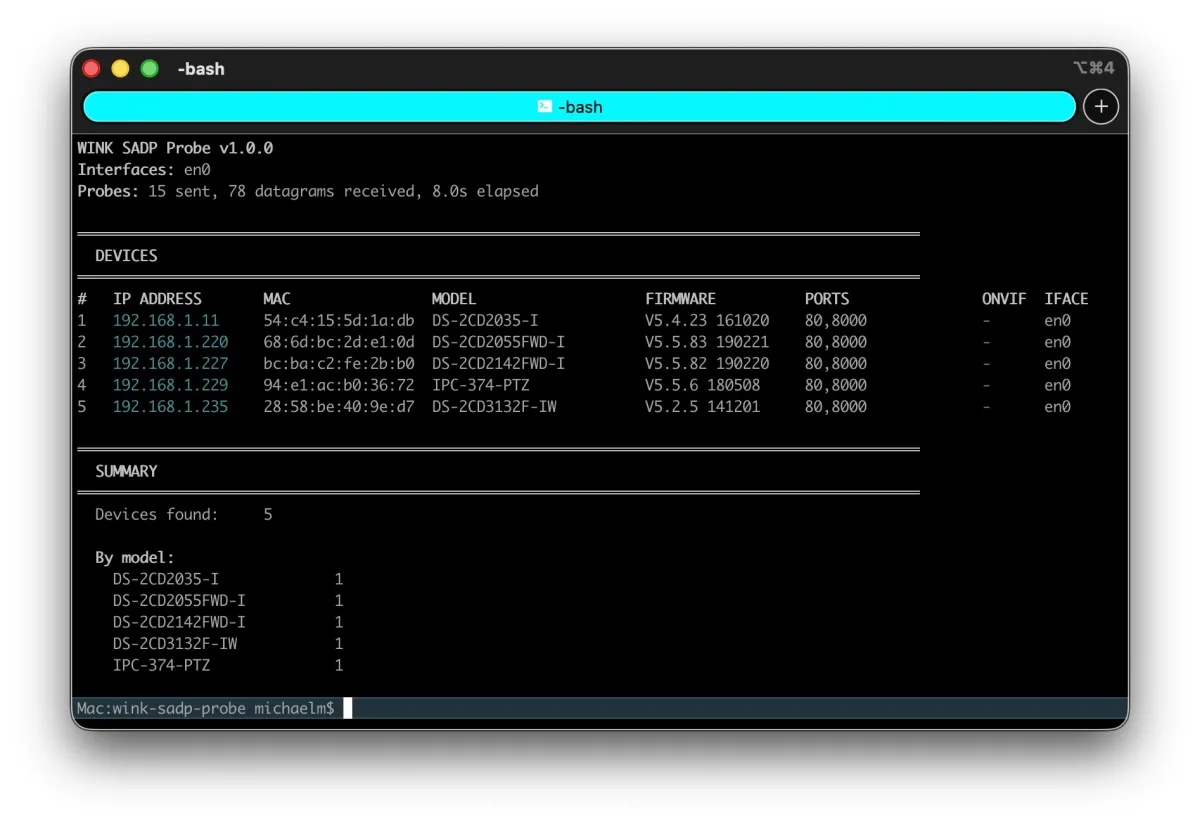
v1.0.0, August 2026Console tool that finds Hikvision-family cameras using SADP, the protocol devices answer even when their IP configuration is wrong, then inspects each one for reachability, services, and security exposure. Read only throughout, and safe on a live production network.
- Finds Misconfigured Devices: wrong subnet, wrong mask, or duplicate address, which no IP based tool can see
- Inspection, Not Just a List: TCP reachability, web interface, ISAPI, RTSP, and ONVIF support per device
- Security Findings: unactivated devices, unauthenticated management APIs, and missing HTTPS
- Multi-VLAN and Multi-NIC: probes each interface individually and tags every device with its segment
- Scriptable: JSON, XML and CSV output with threshold driven exit codes for cron and monitoring
Linux and macOS, single binary, ~8 MB
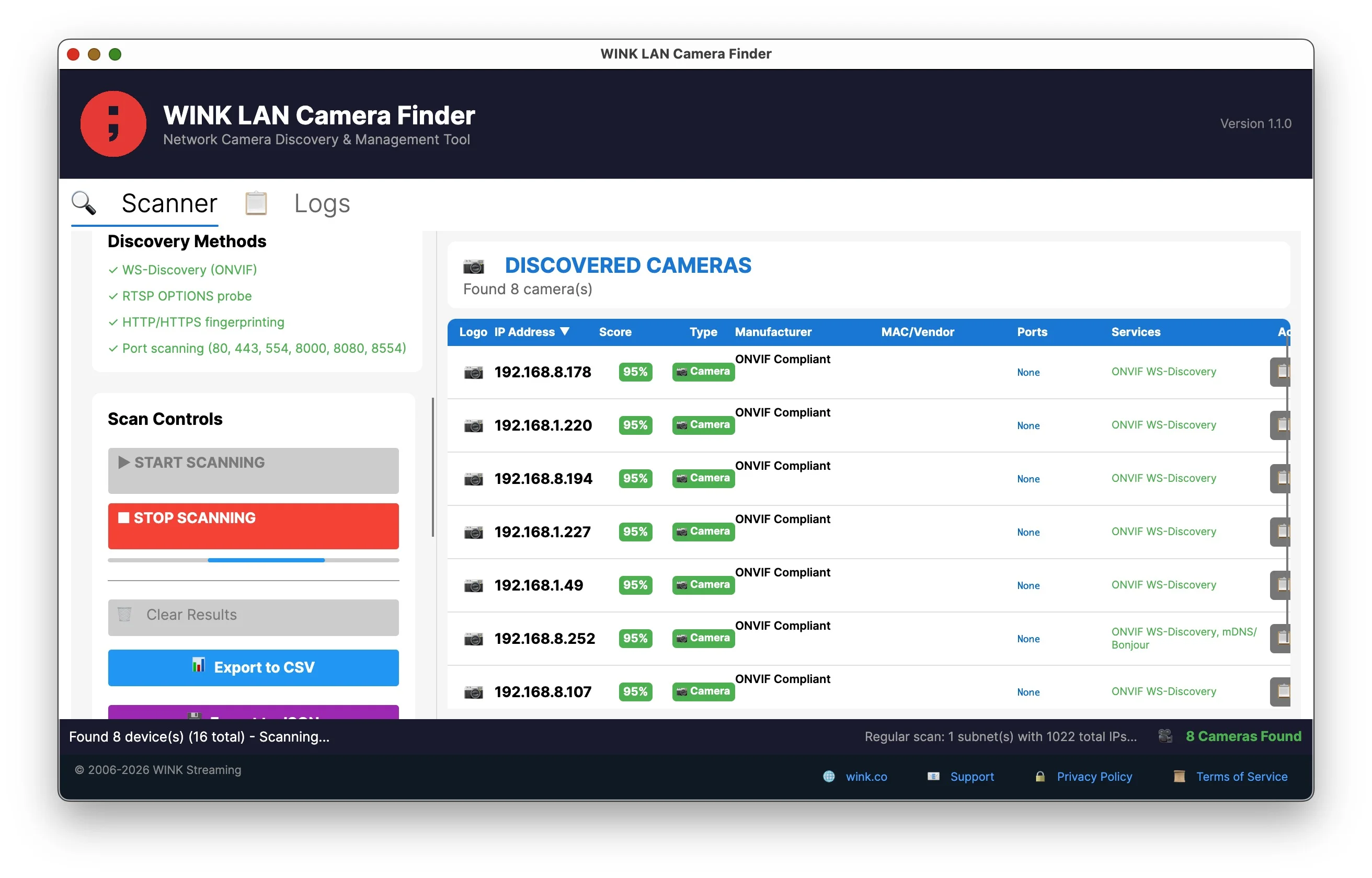
WINK LAN Camera Finder
v1.1.0 - February 2026The most comprehensive network camera discovery tool available. Uses six discovery protocols to find every camera on your network - IP cameras, NVRs, DVRs, and video encoders - regardless of manufacturer. Smart confidence scoring eliminates false positives.
- 6 Discovery Protocols - ONVIF, UPnP/SSDP, mDNS, RTSP, SNMP, HTTP fingerprinting
- Smart Confidence Scoring - Filters servers and printers, surfaces real cameras
- Device Type Classification - Camera, NVR/DVR, Server, Network Device, IoT
- 90+ Port Deep Scan - Hikvision, Dahua, Reolink, XMEye manufacturer ports
- 75,000+ MAC Vendors - Instant manufacturer identification from OUI database
Windows, macOS, Linux - ~65 MB
WINK RTSP Benchmark
Open SourceHigh-performance load testing tool for RTSP streaming infrastructure. Simulates thousands of concurrent viewers to stress test media servers, transcoders, and network equipment. Written in Go for efficient resource usage - approximately 100MB RAM per 1,000 connections.
- Scale Testing - Simulate 10,000+ concurrent RTSP connections
- Transport Options - TCP and UDP interleaved support
- Per-Stream Metrics - Individual packet loss and timing statistics
- Resource Efficient - Lightweight goroutine-based architecture
$ wink-rtsp-bench
Connections: 5000
Avg Packet Loss: 0.02%
Memory Usage: 512 MB
Running...
Windows, macOS, Linux - Build from source
WINK Media Bridge
v1.0.0 - April 2023RTSP to HLS gateway. Point it at a camera, open your browser, watch the video. Single binary with built-in hls.js player page. No ffmpeg, no dependencies, no installation.
- Zero Dependencies - Single binary, pure Go, no ffmpeg required
- Auto-Reconnect - Handles network interruptions automatically
- Built-in Player - Browser page with bundled hls.js (auto-plays)
- Status API - JSON endpoint for monitoring and CI/CD integration
- Exit Codes - Specific codes for auth failure, timeout, codec errors
$ ./wink-media-bridge --rtsp rtsp://admin:pass@192.168.1.100/stream
INFO Starting WINK Media Bridge
INFO Connected to camera
INFO HTTP server listening on :8000
Open http://localhost:8000 in browser
Windows, macOS, Linux - Single binary, ~11 MB
WINK SDP Analyzer
Web ToolGenerate, parse, and validate SDP for H.264, H.265, RTP, and RTSP camera streams. Decode SPS/PPS/VPS parameter sets, extract codec profiles, and detect common SDP errors that cause streams to fail. Built from years of camera interoperability experience across Axis, Hikvision, Dahua, and ONVIF-compliant devices.
- SDP Generator - Create valid SDP with correct profile-level-id and parameter sets
- SDP Analyzer - Parse and validate existing SDP with line-by-line explanation
- RTSP DESCRIBE Parser - Debug camera DESCRIBE responses and find common errors
- Quick Tools - Decode profile-level-id, SPS base64, payload type references
- H.264 & H.265 - Full support for AVC and HEVC codec parameters
v=0
o=- 0 0 IN IP4 0.0.0.0
m=video 5004 RTP/AVP 96
a=rtpmap:96 H264/90000
a=fmtp:96 profile-level-id=42e01f
✓ Valid SDP - Baseline Profile, Level 3.1
Browser-based - No installation required