Free v1.0.0 Read only Linux and macOS

Find the Cameras Before You Can Reach Them

WINK SADP Probe discovers Hikvision-family devices using SADP, the protocol cameras answer even when their IP configuration is wrong. Then it inspects each one and tells you whether you can actually use it.

Download Commands
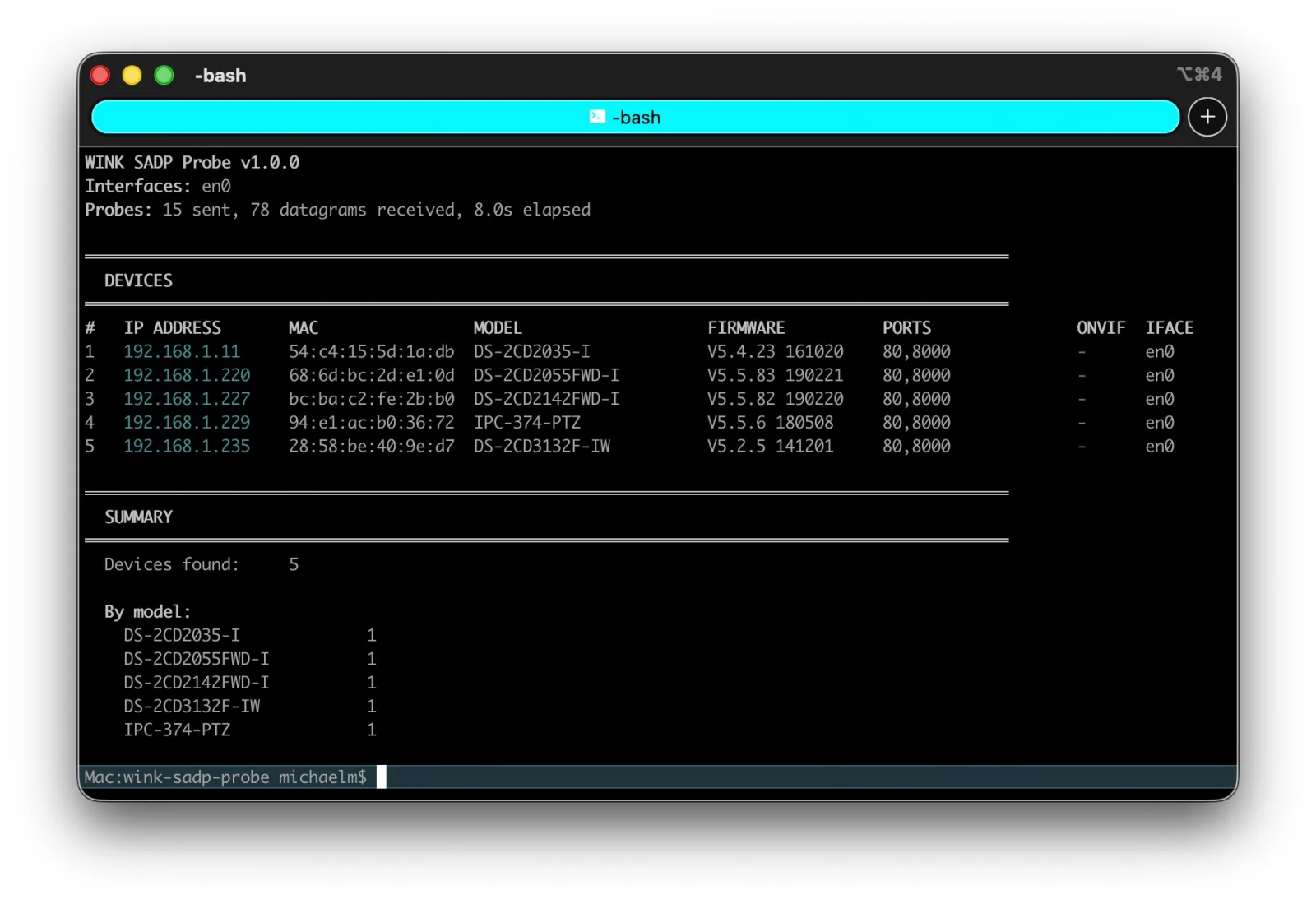
WINK SADP Probe listing five discovered cameras with IP address, MAC, model, firmware, open ports and interface, followed by a summary by model

ping

Needs a reachable address. A camera on the wrong subnet or mask does not have one, so it never answers.

Port scanners

Sweep the addresses you already know about. A device outside every local subnet is not in the range being scanned.

WINK SADP Probe

Works below the layer where addressing matters. If it is plugged in and powered, this finds it, then checks whether you can use it.

Discovery Is Only Half the Job

Every other discovery tool stops at a list. This one keeps going: TCP reachability, the web interface, ISAPI exposure, RTSP, and whether the device speaks ONVIF.

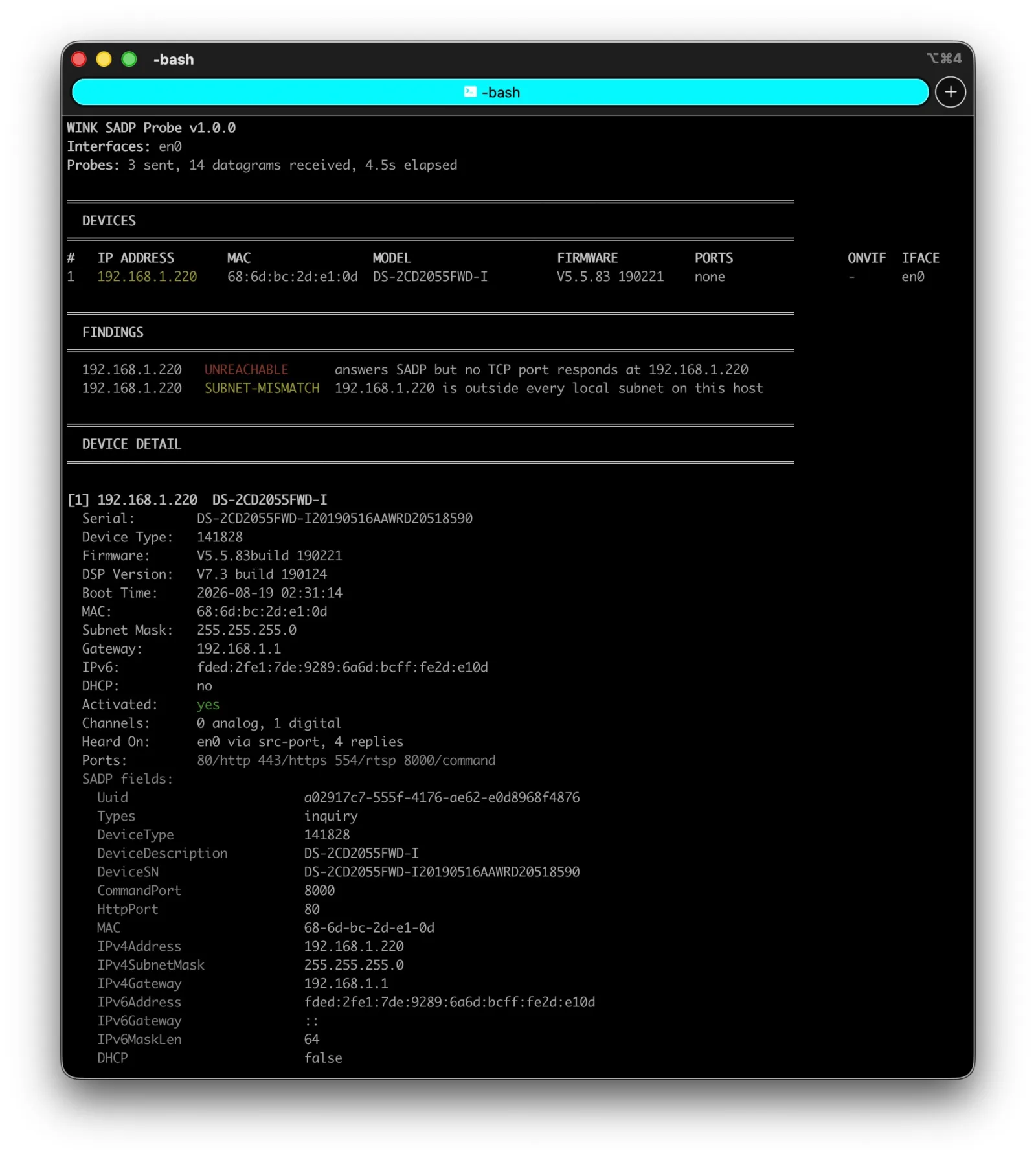
WINK SADP Probe inspecting a single device, showing findings for unreachable and subnet mismatch, then full device detail including serial, firmware, DSP version, addressing, activation state and raw SADP fields

Inspecting one device. Findings sit above the detail, and the detail carries everything the device reported: serial, firmware, DSP version, boot time, addressing, activation state, open ports, and the raw SADP fields underneath.

The Findings Are the Point

An unactivated camera is one anybody on the segment can claim. A device that answers SADP but nothing else is plugged in and running with an address you cannot reach. Both are found in the same eight second run.

Unactivated device

INACTIVE

The device has no admin password set. Anybody on the segment can claim it and become its administrator.

Answers SADP, nothing else

UNREACHABLE

The camera is powered and on the wire, and no TCP port responds at the address it claims. It is running, and you cannot reach it.

Wrong network

SUBNET-MISMATCH

The address the device believes it has falls outside every local subnet on this host, which is why no ordinary tool can see it.

Plaintext management

NO-HTTPS

No HTTPS listener, so management traffic to that device crosses the network in the clear. Management APIs answering without authentication are flagged the same way.

Five Commands

Discovery, live watching, passive listening, single device inspection, and a straight answer about which interfaces can carry a probe.

$ wink-sadp-probe discover
$ wink-sadp-probe discover --interface eth0 --output json
$ wink-sadp-probe discover --timeout 15s --probes 5 One shot search of the selected segments, followed by inspection. Add --no-enrich for discovery only.
$ wink-sadp-probe listen
$ wink-sadp-probe listen --duration 5m --output json Passive. Joins the multicast group and transmits nothing at all, for segments where you would rather not send.
$ wink-sadp-probe inspect 10.0.1.51
$ wink-sadp-probe inspect 10.0.1.51 --output json Probes one address directly and inspects it in full. If it answers SADP but nothing else, the tool says so, and shows the address and mask the device believes it has.
$ wink-sadp-probe interfaces
$ wink-sadp-probe interfaces --all Lists interfaces and states plainly whether each one can carry a probe, with the reason when it cannot.
$ wink-sadp-probe watch --enrich
$ wink-sadp-probe watch --duration 10m --enrich
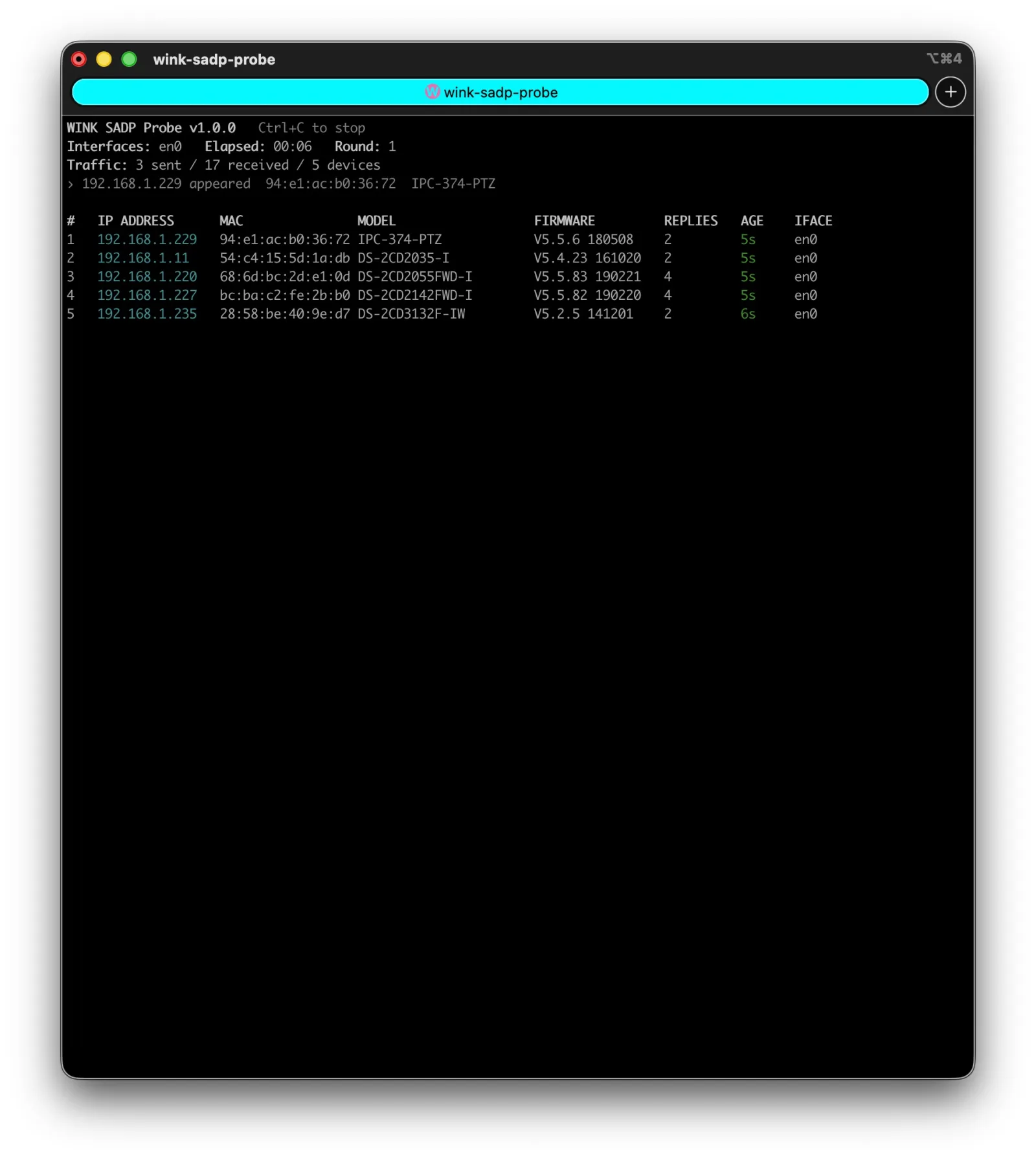
$ wink-sadp-probe watch --probe-every 60s Commissioning mode. Power up a rack and watch devices appear, each inspected as it comes online, so misconfigured units are caught before anyone leaves the site.
WINK SADP Probe in watch mode showing a device appearing on the segment and a live table of five cameras with reply counts and how recently each was heard

What It Checks on Every Device

Discovery gives you an address. Inspection tells you whether that address is worth anything.

TCPWhether any port actually responds at the claimed address
WebThe management interface, and whether HTTPS is offered at all
ISAPIWhether the management API answers, and whether it answers without authentication
RTSPWhether the streaming port is answering, before you try to add it to a VMS
ONVIFWhether a VMS can adopt the device directly or needs the vendor SDK
ActivationWhether the device still has no admin password set
AddressingAddress, mask, gateway and DHCP state as the device believes them
SegmentWhich interface the reply was heard on, so multi-VLAN estates stay untangled

SADP Probe or LAN Camera Finder

Both find cameras and they are not alternatives. LAN Camera Finder is the graphical tool that finds any camera on the network. SADP Probe is the command line tool that finds Hikvision-family devices even when they are misconfigured, and scripts the result.

  WINK LAN Camera Finder WINK SADP Probe
Form Graphical application Console and command line
Protocols ONVIF WS-Discovery, UPnP and SSDP, mDNS, port and default address scanning SADP, which LAN Camera Finder does not implement
Breadth Every major brand, broad sweep Hikvision family and OEM rebrands, in depth
Finds Cameras reachable over IP Also cameras not reachable over IP: wrong subnet, wrong mask, duplicate address
Output Interactive, on screen Console plus JSON and CSV, with exit codes for scripts, cron and monitoring
Audience Anyone finding cameras on a LAN Integrators, DOT and enterprise network staff automating or troubleshooting

Exit Codes for Cron and CI

Every threshold code is opt in. A discovery run that completes normally exits 0 even when it finds nothing, because "nothing here" is a valid answer on most segments.

0
Success
1
General error
2
No devices answered, with fail-on-none
3
Unactivated device found, with fail-on-inactive
4
Answers SADP but no TCP port responds, with fail-on-unreachable
5
No usable socket could be opened

Download

v1.0.0, single static binary, no dependencies and no root required

Licensed CC BY-NC-ND 4.0. Contact us about commercial use.

On macOS and Linux: chmod +x wink-sadp-probe-*

FAQ

What is SADP?

Search Active Devices Protocol, the discovery protocol Hikvision-family cameras answer. It runs over UDP port 37020 on multicast group 239.255.255.250 and carries XML. Because it is link local, a device replies even when its IP address, subnet mask or VLAN is wrong.

How is this different from WINK LAN Camera Finder?

LAN Camera Finder is a graphical tool that finds any camera reachable over IP, across every major brand. SADP Probe speaks SADP, which LAN Camera Finder does not implement, so it also finds Hikvision-family devices that are not reachable over IP at all. They are complementary.

Is it safe to run on a production network?

Yes. It is read only throughout. It discovers and inspects, never writes, and no credentials are sent to any device. SADP can set addresses and activate devices; this tool deliberately does not.

Does it need root or libpcap?

No. A single static binary with no dependencies. No libpcap, no vendor SDK, no root privileges and no installer.

What if multicast is filtered?

Each round also goes to the limited broadcast address, which reaches devices whose own addressing is wrong for the segment. Where multicast is filtered entirely, a unicast sweep of a CIDR is available as a fallback.

Can I use it in scripts and monitoring?

Yes. It emits JSON and CSV, and exit codes are threshold driven. --fail-on-inactive exits 3 and --fail-on-unreachable exits 4, so cron and monitoring can alert on the condition you care about.

Prefer a Web Interface?

All of the WINK console tools are built into WINK Forge and the WINK Media Router behind an easy to use web GUI. Run discovery, RTSP and HLS analysis, packet capture and benchmarking from the browser, with results as tables and charts instead of terminal output, and history retained across runs. The same capability without the command line.

The rest of the family: WINK RTSP Stats, WINK HLS Stats, WINK RTP Dump, WINK RTSP Benchmark, WINK Camera Studio, and all WINK Media Tools.