The Soduto app icon, a green tile with a white diamond lattice

Soduto 2026 Refresh

Version 3.2.0 (build 26)

Soduto is a free menu bar app that connects your Mac to an Android phone over your own Wi-Fi: files in both directions, a shared clipboard, and phone notifications and texts on the desktop. This is an updated build for current macOS.

Soduto was written by Giedrius Stanevičius and is maintained by Sannidhya Roy and contributors. We only did the 2026 build.

Free, GNU GPL v3. macOS 14 Sonoma or later, Apple silicon and Intel. Needs the free KDE Connect app on the phone.
Who wrote it

Soduto is a community project, not a WINK Streaming product. We use it ourselves, a few things had stopped working properly on recent versions of macOS, so we fixed them and put out a build. The name, the icon and the artwork are all the originals.

RoleWhoWhere
Wrote Soduto Giedrius Stanevičius github.com/soduto/Soduto
Maintains the current fork Sannidhya Roy and contributors github.com/sannidhyaroy/Soduto
This build WINK Streaming www.wink.co

Soduto is free software under the GNU General Public License v3, and the complete source ships inside the app.

What it does

Soduto speaks KDE Connect, the protocol KDE wrote so that a desktop and a phone sitting on the same network can talk to each other. Install KDE Connect on the phone, pair the two once, and after that they find each other whenever they are on the same Wi-Fi.

What you get out of it is file transfers in both directions, a clipboard that follows you between the two, phone notifications and texts on the desktop, the phone's storage mounted in Finder, and the phone working as a trackpad or a presentation remote.

None of it goes through a server. There is no account to make and no sign-in, and nothing of yours leaves the network the two devices are sitting on.

How Soduto connects a Mac to a phone A Mac and an Android phone connected directly across a local Wi-Fi network, with a crossed-out cloud above showing that no server sits between them. No server in the middle Mac Android phone Your Wi-Fi network Files, clipboard, notifications Texts, remote input, battery

What's new in this build

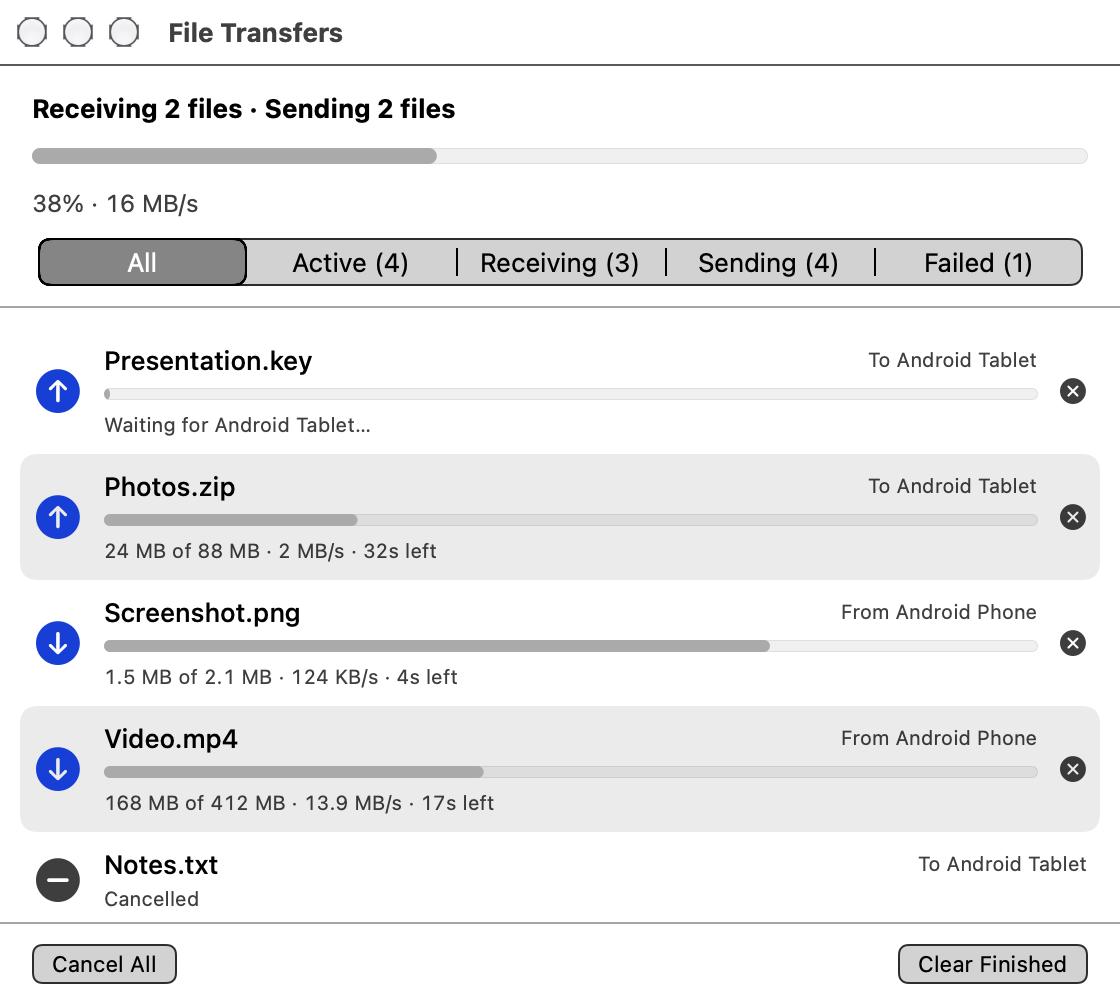
The only new feature is a File Transfers window. Before it there was very little to look at while files were moving, and if one of them stalled you had no way of telling which. The window lists everything going in either direction with its own progress bar, speed and rough time left, and a line across the top for the total. You can filter it, cancel one transfer or all of them, and reveal a finished file in Finder or double-click the row to open it. The menu bar icon carries a count of whatever is still running. It is under File Transfers in the menu, or Command T.

The Soduto File Transfers window showing a summary bar reading Receiving 2 files, Sending 2 files at 38 percent and 16 MB per second, a filter bar, and five transfers listed with individual progress bars

The file names and speeds in this shot are made up, but the window is the real one.

The rest of the changes are repairs rather than features.

Everything else it does

All of this comes from upstream Soduto rather than from us, and it works with any KDE Connect client on the other end.

Credits in the app

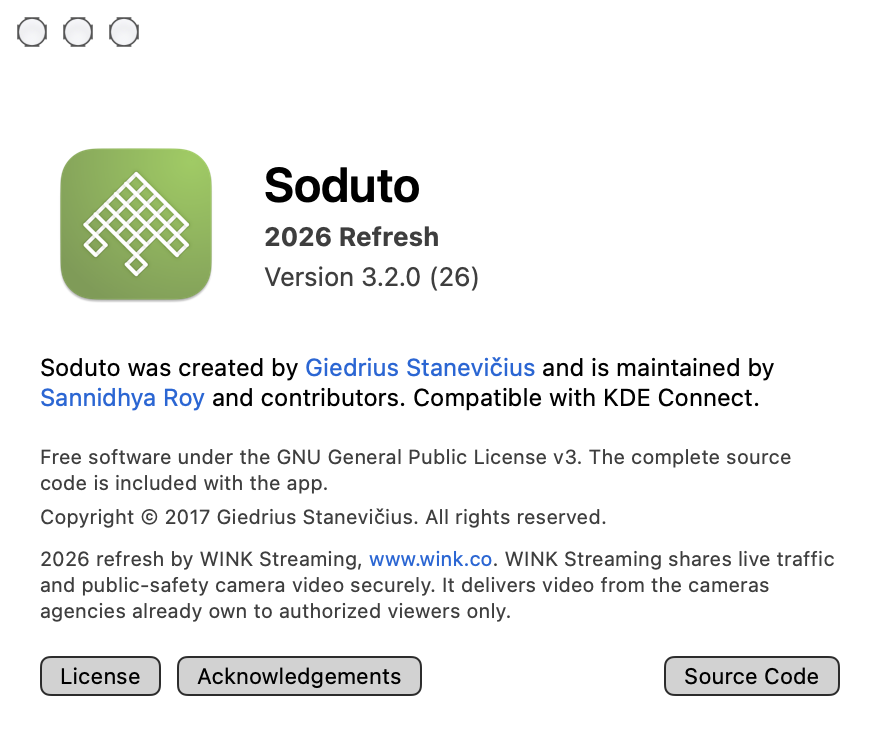
The About window carries the same credits this page does, so nobody has to come back here to work out who wrote what. It names the original author and the current maintainer, states the licence, and has a button that opens the source.

The line about WINK at the bottom of it is the whole of our billing inside the app, and it is the same wording we have used here.

The Soduto About window showing the app icon, version 3.2.0 build 26, credits to Giedrius Stanevicius and Sannidhya Roy, the GNU GPL v3 notice, and buttons for License, Acknowledgements and Source Code

Soduto by Giedrius Stanevičius, maintained by Sannidhya Roy.

What you need

Mac macOS 14 Sonoma or later. The download is a universal build, so it runs natively on Apple silicon and on Intel.
Phone or tablet The free KDE Connect app for Android, from Google Play or F-Droid. Any device running a KDE Connect client will pair with it. There is no iPhone version.
Network Both devices on the same local network.
Price Free. No ads, no accounts, no tracking.
Licence GNU General Public License v3, with the complete source inside the app.
Updates This build does not update itself. New releases go up on the GitHub project.

Download

Soduto 3.2.0 for macOS 14 and later. Universal build, about 25 MB.

Download the DMG Source on GitHub
SHA-256 of Soduto-3.2.0.dmg, also in Soduto-3.2.0.dmg.sha256: af7996238cf2e465a8ae0936be912ef726fa60d1da742f9e0579fbf9a9a984ef

Check it with shasum -a 256 Soduto-3.2.0.dmg. The disk image is not GPG signed. The fork's release key belongs to its maintainer, and it is not ours to use, so the checksum is the thing to verify against.

Installing it

  1. Open the DMG and drag Soduto to Applications.
  2. Open Soduto. macOS will most likely say it cannot verify the developer: open System Settings, go to Privacy & Security, click Open Anyway and confirm. You only do this once.
  3. If you are asked whether Soduto can access data from other apps, allow it. The Share extension and the Files helper need that.
  4. Install KDE Connect on the phone, and check both devices are on the same Wi-Fi.
  5. Pair from the Soduto icon in the menu bar.

Questions

Is Soduto a WINK Streaming product?

No. It was written by Giedrius Stanevičius and is maintained by Sannidhya Roy and contributors. We put out the 2026 build, which adds the File Transfers window and repairs a handful of things that had stopped working on recent macOS. It is free software under the GPL v3.

Does it work with an iPhone?

The phone side is KDE Connect, and in practice that means the free KDE Connect app for Android. Any device running a KDE Connect client can pair with it, but there is no iPhone version.

Does my data pass through a server?

No. The Mac and the phone talk to each other directly over the local network. There are no WINK servers and no third-party servers in the path, no account to create, and no tracking.

Why does macOS warn me when I open it?

Because it does not recognise the developer certificate on this build. Open System Settings, go to Privacy & Security and click Open Anyway, and that is the end of it.

Does this build update itself?

No. Updates are switched off, so nothing checks in the background and you will not be prompted. New releases go up on GitHub.

Is the download verifiable?

There is a published SHA-256 you can check the DMG against. The disk image is not GPG signed, for the reason given next to the checksum above.

Where is the source code?

Inside the app, and on GitHub, under the GNU General Public License v3.

Soduto is free software under the GNU General Public License v3. Copyright © 2017 Giedrius Stanevičius. Written by Giedrius Stanevičius, maintained by Sannidhya Roy and contributors. Compatible with KDE Connect.

2026 refresh by WINK Streaming, www.wink.co. WINK Streaming shares live traffic and public-safety camera video securely. It delivers video from the cameras agencies already own to authorized viewers only.