Utility and Energy Video

See the sites nobody is standing at, from the control room, on the links you already have out there. Nothing new to maintain at the far end and no route into your control network.

Schedule Demo

Sites With Nobody At Them

Most of a utility's footprint has no staff on it. Substations, pump and lift stations, reservoirs, wellheads, solar and wind sites, booster stations and remote valve houses run unattended for weeks, and the people responsible for them are sitting in a control room somewhere else looking at a SCADA screen. That screen tells them a breaker tripped or a pump stopped. It cannot tell them whether the gate is open, whether there is water where there should not be, or whether somebody is standing inside the fence.

Cameras at those sites usually exist. What is missing is a way to see them from the control room without stringing a second network out to every location, and without opening a path into the operational environment that the security team will refuse to sign off on. The constraint is rarely the camera. It is the link, the firewall and the fact that nobody is going to drive two hours to reboot an appliance.

What Each Kind of Site Actually Gives You

Remote sites are not interchangeable. The link, the power budget and the reason for the camera differ, and that changes what is realistic to publish from each one.

Substations and switchyards

Usually have real connectivity and real power. The cameras are there for perimeter and for confirming a condition before dispatching a crew. These are the sites where live video is most immediately useful.

Pump, lift and booster stations

Numerous, small, and frequently on cellular. Often a single camera on a door or a wet well. Bandwidth is the binding constraint, and the link is shared with the telemetry that actually runs the site.

Treatment and process plants

Staffed by day, unattended at night, with a camera count closer to a small campus. These behave like a conventional site and are usually the easiest to bring in.

Generation and field assets

Solar and wind sites, tank farms, dams and spillways. Wide areas, few cameras, and links that were sized for telemetry rather than for video.

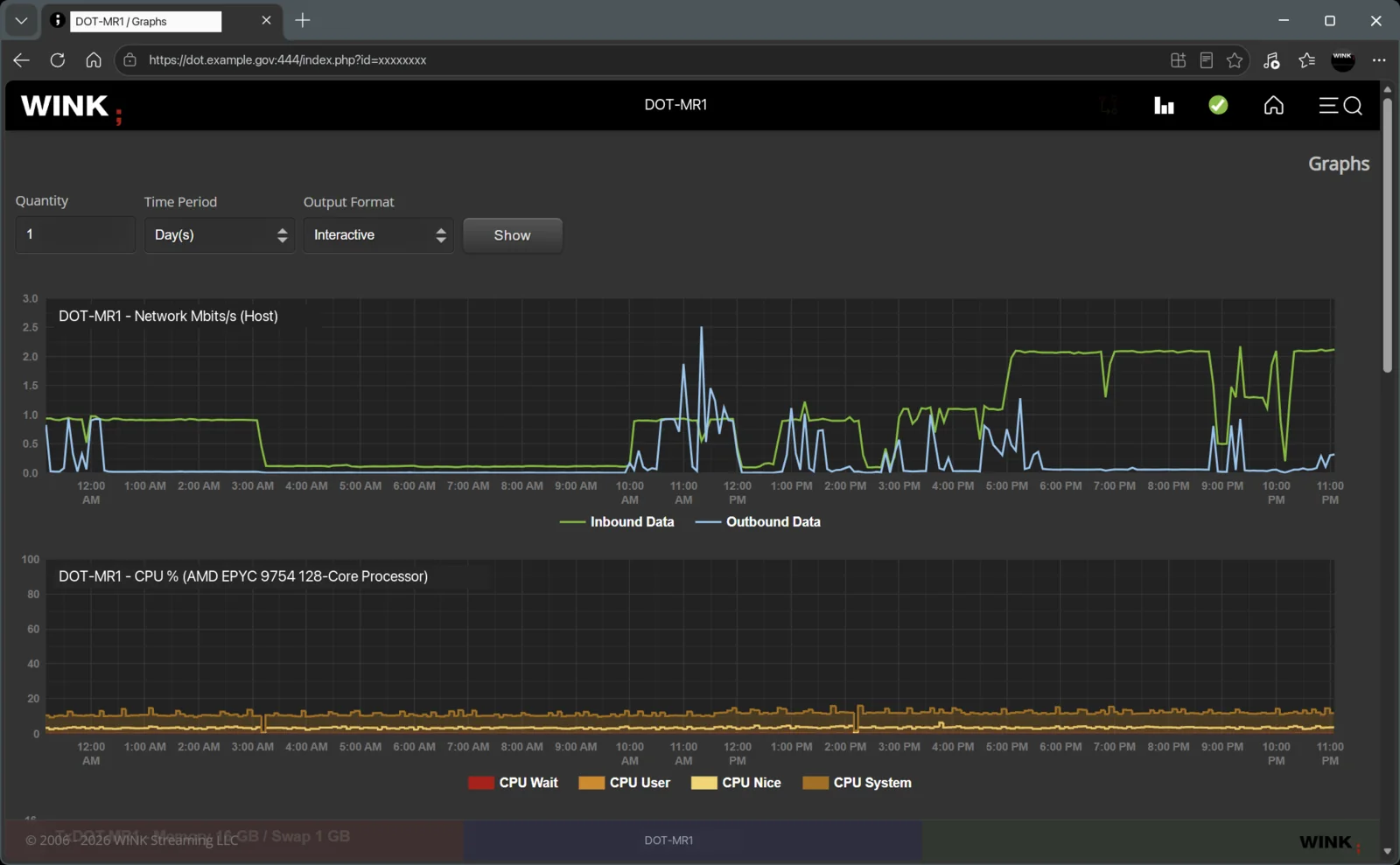
WINK Media Router graphs showing inbound and outbound network throughput and CPU utilisation over a 24 hour period
WINK Media Router throughput and load over 24 hours. The deployment shown is a roadway estate; identifying fields are redacted.

Video That Lives Within the Link

The question at a remote site is not whether video is possible, it is what it costs you on a connection that something more important is already using. Throughput is visible per site over time, so adding a camera is a decision you make with a number rather than a hope.

Where the link is genuinely thin, the answer is a lower frame rate and a tighter bitrate rather than no video at all. WINK Forge publishes H.264 by default, which is the codec that survives the packet loss cellular and long-haul wireless produce. H.265 looks better on paper at these bitrates and falls apart faster in practice.

Next to the Control System, Not Inside It

Video beside the alarm, not in place of it

An operator who gets a point alarm wants to look at the site before deciding whether it is a dispatch. Pairing a camera with a site lets them answer that in seconds instead of sending somebody. We have a separate write-up of how that pairing is done in SCADA video integration.

No path into the control network

Video distribution sits on the corporate or security side. It is not a route into the operational environment, it does not write anything anywhere, and it is not a component your control system depends on to keep running.

However each site connects

On Genetec, Security Center is already holding the stream and passes us a copy, so the camera is not pulled a second time and that path opens nothing inbound. At sites on another VMS, or where we take the camera directly, the connection is RTSP over a route your network and security teams define.

Nothing to maintain at the far end

Whatever is already at the site keeps doing its job. There is no appliance added at each location that somebody has to drive out to when it stops responding.

The Control Room Does Not Have to Be a Room

Conventional video systems tie the viewer to a workstation on a particular network in a particular building. For a utility that is exactly backwards: the assets are spread over a service territory, and the people responsible for them are on call, in a truck, or at home at two in the morning deciding whether this is worth a crew.

We lift that restriction. Video is a browser session from wherever the person is, over whichever path your security team is comfortable with. The public internet with per session authentication, a VPN you already run for field access, a private circuit into the corporate network, or a different answer per site. An estate that grew by acquisition and annexation does not have to be normalised onto one network design first.

Central management for every site at once

One place that holds every remote site, who can see it, and whether it is currently publishing. For an operator with hundreds of small unmanned locations, that single inventory is usually worth more than any individual camera.

The call-out that does not happen

A look at the site before dispatching is the cheapest thing in the whole operation. One avoided night call-out to a station where nothing was actually wrong pays for a good deal of camera.

One Territory, Seen From One Place

Unmanned utility sites scattered across a service territory, on mixed link types, all reaching one control view SERVICE TERRITORY Substation N fibre Pump station 7 cellular Reservoir wireless Treatment plant fibre Lift station 12 cellular Solar array wireless Valve house cellular One view of every site publishing or not control room on-call, at home crew in a truck Circle size is camera count. Line style is the link: solid fibre, dashed wireless, dotted cellular.
Sites stay exactly as they are, including the ones on cellular. Distribution sits on the corporate or security side and is not a route into the control network.

Who Gets to See It

Control room, field crews and contractors

Operators see the sites they run. A crew on the way to a call can open the same camera on a phone before they arrive. A contractor working one facility gets that facility and nothing else, for as long as the work lasts.

Mutual aid and responding agencies

During a storm, a spill or a security event, a specific set of cameras can be opened to an emergency manager or a responding agency and closed again afterwards. It is a deliberate, time-bounded grant rather than a standing connection into your estate.

Talk to Us About Your Remote Sites

Bring the site list, what the links out to them look like, and which ones you cannot see today. A demo runs against your own feeds.

Schedule Demo