Every eighteen months someone asks us why we are still shipping H.264. The answer has not changed, and this year we can put numbers on it: there is more bitrate left on the table inside H.264 than you would gain by switching away from it, and taking it costs a fraction of what a codec change costs.
We have argued this before in Why H.264 Is Almost Always The Answer. That piece was mostly about what H.265 and AV1 cost you: decode CPU, device support, packet loss behaviour, encoding latency. What it did not do was say how much better H.264 itself could be if you stopped running it on defaults. This is that measurement.
The short version. On a fixed roadway camera, about half a second of encoder lookahead cut the bitrate needed for equal quality by 43 to 45%, at about 1.1 times the CPU. A quarter of a second got most of it. None of that requires a new codec, a new decoder, a new player, or a single new camera.
The ledger, before anything else
These optimizations are not free. They cost encoder delay and they cost a little CPU, and we are going to be precise about both, because the honest comparison is not "optimized H.264 versus doing nothing". It is "optimized H.264 versus the codec you were thinking of switching to".
| Optimizing H.264 (measured here) | Switching to H.265 or AV1 | |
|---|---|---|
| Bitrate saved | 43-45% on roadway cameras | 2-3% at typical camera bitrates |
| Added encoder latency | 250-550 ms | 10-50x H.264 encoding time |
| Encoder CPU | about 1.1x | Far higher, and impractical on embedded cameras for AV1 |
| Decoder CPU on the viewer | unchanged | Up to 10x for H.265 in software decode |
| Device and browser support | Universal | Partial, and worst on the phones the public uses |
| Behaviour under packet loss | Unchanged, still H.264 | Worse, which matters on cellular and wireless backhaul |
| Cameras you have to replace | None | Any that cannot encode the new codec |
The left column is measured in this report. The right column is our published position from Why H.264 Is Almost Always The Answer and the AV1 backport experiment. We did not re-benchmark H.265 or AV1 here. We did not need to: the gap is not close.
That is the whole argument
A codec change asks you to spend ten to fifty times the encoding latency, push every viewer onto a heavier decoder, give up device compatibility, and in many cases replace cameras, in exchange for two or three percent at the bitrates security and traffic cameras actually run at. Half a second of lookahead asks for a tenth of a core and returns forty-three percent. We are not arguing H.264 is the better codec in the abstract. We are arguing that almost nobody has finished using the one they already have.
Where this started
This week Jan Ozer's "Optimizing x264 Settings and Per-title Ladders" showed up on Hacker News. It is careful work, and we want to thank him for it. We read his notes next to ours, compared them parameter by parameter, and decided it was time to publish our own measurements. His closing advice is to optimize H.264 before you go shopping for another codec, which is the argument we have been making for years.
Not everything transfers to live streaming. His headline result was 4.90 to 3.27 Mb/s: 33% less bandwidth, +0.66 VMAF, at 3.2 times the encoding time. That is a video-on-demand result. It uses a veryslow preset, a 10 second GOP, two-pass rate control, and a per-title ladder chosen after analysing the whole title. Each of those ingredients depends on something a live stream does not have: the future.
- Two-pass needs the whole file before the second pass starts.
- A per-title search needs the whole title.
- Veryslow buffers 84 frames before it outputs anything. We measured it.
- A 10 second GOP collides with 1 to 2 second live segments, and with the keyframe-per-second rule in our camera guide.
Those tools still matter to us. They just belong to recorded video, which is why WINK Archive uses the offline side of this playbook. For the live side the question was narrower: with a latency budget of a few hundred milliseconds, how much can a live H.264 encoder still save? More than the VOD article found, as it turns out. Static roadway scenes are the best case for the one tool that survives.
What we found
All figures are BD-rate on VMAF: the bitrate change needed for equal quality, interpolated over the overlapping range of four measured rate points. The baseline is x264 veryfast with tune zerolatency, one thread per stream, constant bitrate with a one second buffer, and a keyframe every second. The data is 1,586 encodes from four RTSP cameras through afternoon rain, dusk and night, plus a handheld reference.
How we measured it
Each camera was recorded with -c copy. A 30 second excerpt was decoded once, Lanczos-scaled, converted from full range to limited range where needed, and stored losslessly as FFV1. Every encode starts from that file and is scored against it. Metrics are VMAF v0.6.1, VMAF NEG, PSNR-Y and SSIM per frame, reported as mean and 5th percentile. Bitrate is summed packet bytes. For a real camera this measures fidelity to the received feed, not to the scene.
Encoder delay was measured rather than inferred. A small C program drives the same libx264 that FFmpeg links and counts the frames that go in before the first frame comes out. With one thread per stream, delay is max(B-frames, rc-lookahead) + 1 frame. The defaults are much longer: veryfast buffered 29 to 32 frames, medium 59 to 62, veryslow 84 to 87.
CPU is rusage seconds per second of video on an M2 Pro under load. Use the ratios, not the absolute density. Software was FFmpeg 8.0 and x264 0.165.3222.
A note on the tooling, since we are about to quote x264 command lines
The measurements here were run with stock FFmpeg and x264 on purpose. They are what anyone else can install, so anyone can check this work or run the same matrix against their own cameras.
Our commercial products do not ship FFmpeg. Forge is our own code. It is built on some of the same underlying libraries, which is why the behaviour described in this report carries across, and we meet the obligations that come with those libraries, GPL included. The recipes below are written as FFmpeg invocations because that is the form everyone can read and test, not because they are what runs inside the product.
The trade: bandwidth for latency
Under zerolatency a live encoder gives up B-frames, the rate control lookahead and MB-tree. MB-tree is the one that matters for cameras. It tracks how much each block is referenced by future frames, then spends quality on long-lived blocks that later frames inherit almost for free. A fixed roadway camera is almost all long-lived background.
Here is what that costs, frame by frame, at one megabit:
The sawtooth is the whole story. The average is not where zerolatency hurts. It is the frames immediately after each keyframe, and on a one second GOP that is a quarter of the stream.
This is what it looks like on the picture. Same camera, same second, same bitrate:
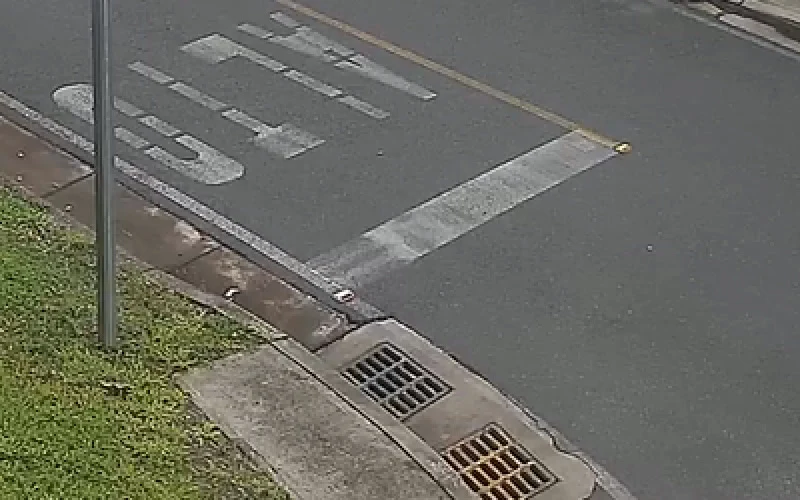
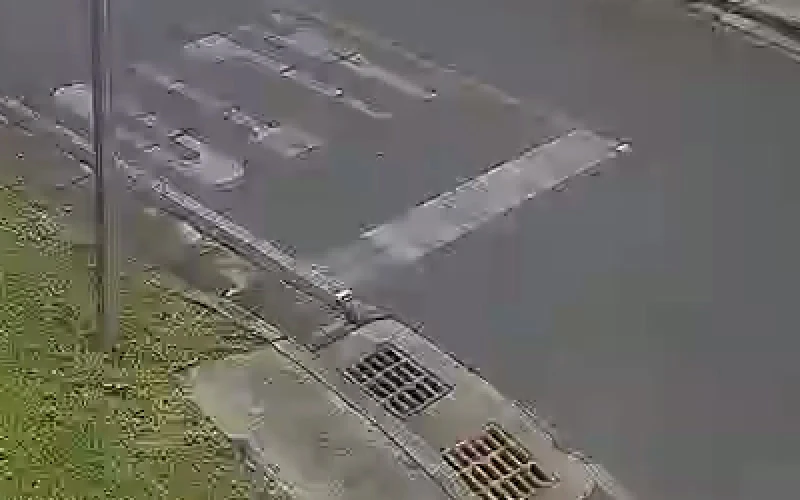

Frame 280, the zerolatency encode's worst frame, at 2x nearest-neighbour. At the same bitrate the zerolatency encode loses the yellow centre line, ghosts the road lettering and fills the drain grating with mush. Nothing in the scene moved.
The numbers behind it, BD-rate against the baseline:
| Config (one thread) | Delay at 20 fps | CPU | Street A | Street B | Handheld |
|---|---|---|---|---|---|
| zerolatency, faster | 0 | 1.27x | -9% | -10% | -10% |
| 2 B-frames, no lookahead | 150 ms | 1.0x | +11% | +1% | -5% |
| lookahead 4, faster | 250 ms | 1.2x | -35% | -38% | -14% |
| lookahead 6, faster | 350 ms | 1.2x | -40% | -42% | -19% |
| lookahead 10, faster | 550 ms | 1.1x | -45% | -43% | -21% |
| lookahead 10, medium | 550 ms | 1.25x | -46% | -44% | -30% |
| x264 default veryfast (frame threads) | 1,600 ms | 1.1x | -40% | -41% | -10% |
Lookahead with MB-tree is the win. B-frames alone are not.
Without lookahead, B-frames never helped a street camera. Past 10 frames there is nothing more to get: 15 and 30 were within half a point of 10 on handheld. And x264's own defaults buffer 1.6 seconds at 20 fps for less gain than a deliberate 0.25 to 0.55 seconds.
Whether you can afford it depends on the path
| WINK path (our published glass-to-glass) | + lookahead 4 at 20 fps | + lookahead 10 at 20 fps | + lookahead 10 at 13 fps |
|---|---|---|---|
| MoQ, 200-300 ms | about double | about triple | about 4x |
| LL-HLS, 900 ms | +28% | +61% | +94% |
| RTWebSocket, 1-2 s | +17% | +37% | +56% |
A frame-counted lookahead costs more at low frame rates. Street A dropped to about 13 fps at night, so lookahead 10 went from 550 ms to 846 ms with nobody touching a setting. Budget the lookahead in milliseconds, using the camera's measured frame rate.
The free one: stop slicing
tune=zerolatency turns on sliced threading, 7 slices per frame on a 12 core box. Slices cannot predict across their own boundaries. A transcoder carrying hundreds of camera streams has more streams than cores, so it does not need slices inside a single stream. Extra bitrate for equal quality against one thread:
- Indoor infrared camera: +24% by day, +25% at dusk, +30% at night.
- Handheld: +12%.
- Street cameras: -0.3% to +4%.
One thread per stream also used slightly less CPU. This is the rarest kind of result: a saving with no cost on the other side of the ledger. If you run tune=zerolatency today and you transcode more streams than you have cores, set threads=1 and take the bits back.
This is how Forge already runs
WINK Forge carries hundreds of concurrent transcode processes on a single deployment, which is exactly the workload shape where intra-stream slicing buys nothing: there are already far more streams than cores, so the parallelism that matters is between streams rather than inside one. Forge schedules on that basis, so the slice penalty described here is not one its deployments pay.
Keyframes are the biggest lever, and not a latency one
On a static camera the IDR is most of the bitrate. BD-rate against the one second zerolatency baseline:
Our camera guide's keyframe-interval-equals-frame-rate rule exists because packet loss happens and viewers join mid-stream. That rule still stands. What this table does is price it, so the trade is made deliberately instead of by default.
Two things to know before reaching for a longer interval. Bursts grow with it: even at constant bitrate with a one second buffer, the busiest second grew from 1.25 times the average at 1 s to about 2 times at 4 to 10 s. And LL-HLS does not need an IDR per part. Only the segment needs one, so a 2 second keyframe interval with 2 second segments is a legitimate live configuration.
Why we still keep keyframes short
Most of our cameras live on networks that lose packets: cellular, wireless backhaul, long haul links. A longer keyframe interval means a lost packet corrupts more frames before the next clean refresh. Forge reconstructs streams damaged by packet loss before re-encoding, and each output sets its own keyframe interval, which is what makes a 2 second public feed alongside a 1 second operator feed a practical configuration rather than a gamble.
Capped CRF needs lookahead and a longer GOP
Capped CRF lets a quiet camera fall well below its cap. How you configure it decides whether that happens at all.
- With a 1 second GOP and a 1 second buffer at the cap, the cap binds almost all the time.
- Without lookahead it is worse than useless. On Street A, zerolatency at CRF 22 scored lower VMAF than at CRF 34, because the rate control slammed into the VBV ceiling on every keyframe.
- With lookahead and 4 second keyframes it was the most efficient live mode we measured.
Bitrate needed to reach VMAF 90 on Street A in afternoon rain:
| Configuration | Bitrate | Against baseline |
|---|---|---|
| Baseline (zerolatency, 1 s keyframes) | 3.14 Mb/s | |
| Lookahead 10, CBR, 1 s keyframes | 1.66 Mb/s | -47% |
| Lookahead 10, CBR, 4 s keyframes | 0.97 Mb/s | -69% |
| Lookahead 10, capped CRF, 4 s keyframes | 0.53 Mb/s | -83% |
One caveat worth taking seriously. Capped CRF streams at a 4 second GOP had one second peaks of up to 3.9 times their average. Size the cap and the buffer to the uplink, not to the average you would like to pay for.
The light changes the right answer too. On Street A the baseline needed 1.79 Mb/s for VMAF 80 in afternoon rain, 0.91 at dusk and 0.73 at night. A constant bitrate sized for daytime over-serves the night by a wide margin.
Filters: our earlier notes, checked on real rain
We re-ran the exact filter graphs from our earlier synthetic test at CRF 28 on the camera footage.
| Filter | Synthetic notes | Real footage, bitrate at CRF 28 | Verdict |
|---|---|---|---|
| Mild hqdn3d | +0.7% | -0.1% to -1.9% | Confirmed, saves nothing |
| Stronger hqdn3d | -8.7% | -2% to -10% | Direction confirmed |
| Sharpen (unsharp) | +30.5% | +17% to +24% | Confirmed, costs bits |
Sharpening is the metric trap
VMAF rose to as high as 99.6 while VMAF NEG fell by up to 6 points and PSNR by up to 8 dB. Anyone tuning on plain VMAF would ship it. Nobody should. This is the clearest example we have of why a single metric is not enough to tune on.
At equal quality, no denoiser helped. Mild and chroma-biased denoise landed within plus or minus 2%. The stronger denoise lost on every clip and lost more as the light fell: on Street A, lookahead plus strong denoise saved 42% by day, 20% at dusk and 19% at night, against 45%, 43% and 40% without it. One honest caveat: scored against the camera feed, a denoiser is penalised for removing noise the camera recorded. Whether an operator would prefer the denoised night picture is a viewing question these metrics cannot settle.
The recommendation is short. Do not add a filter. Add lookahead.
Two audiences, two encodes
We work in places where video runs continuously and somebody is relying on it: traffic and transportation, law enforcement and emergency management, utilities, ports, campuses and city camera programmes. The deployments look different from the outside, but almost all of them share one shape. The same camera is watched by two audiences who want opposite things, and encoding for the average of the two serves neither.
Someone is driving the camera. An operator in a control room is panning to an incident, zooming onto a lane or a gate, reading a sign or a label. Every millisecond of encoder delay lands in the gap between moving the joystick and seeing the picture move, and operators overshoot when that loop is slow. That feed should keep zero encoder delay and pay the bitrate.
Everyone else is just watching. A traveler checking a road before leaving home, a duty manager with a wall of tiles, a partner agency monitoring a shared feed, a citizen on a public portal. None of them is steering anything, and none of them notices half a second. But there are far more of them, usually on phones, and the count spikes during exactly the events the cameras exist for: storms, incidents, evacuations. That is where bandwidth turns into money, and it is where everything in this report belongs.
The answer is not one encoder setting. It is two outputs per camera.
An operator feed tuned for delay, and a public feed tuned for bits, from the same ingest. Forge produces multiple outputs per camera, each with its own resolution, bitrate, frame rate, keyframe interval and encoder preset, so this is a configuration question rather than a second deployment. Through WINK Media Router the same camera reaches partner agencies, each with its own credentials, IP whitelist and camera set. Through WINK Public Eye it reaches 511 services, public websites, kiosks and mobile apps, with privacy zone masking, restricted access hours and an audit trail.
Privacy masks do not conflict with any of this. A masked region is a flat static area, which costs almost nothing to encode.
Does the saving survive a camera that moves?
To test camera movement we built PTZ clips out of real footage rather than synthetic motion. We took a panoramic camera's full 4096x1248 recording, day and night, and moved a 16:9 window across it: hold 8 s, pan across the whole street in 4 s, hold 6 s, zoom 2x in 3 s, hold 9 s. The pixels, the rain, the sensor noise and the camera's own compression are real. The camera motion is simulated, which leaves out motion blur, rolling shutter, autofocus hunting and exposure changes during a move. Treat these as indicative.
| PTZ clip, BD-rate vs zerolatency baseline | Day | Night |
|---|---|---|
| Lookahead 4, faster (+250 ms) | -35% | -26% |
| Lookahead 10, faster (+550 ms) | -42% | -33% |
| Lookahead 10, 4 s keyframes | -59% | -53% |
| Lookahead 10, capped CRF, 4 s keyframes | -70% | -71% |
| 2 B-frames, no lookahead | +3% | -2% |
The saving survives the move. By day it was nearly the same as on the static view of the same camera, and smaller at night. The worst frame of the move is where zerolatency hurts: at 2 Mb/s with one second keyframes, the lowest scoring frame during the pan was VMAF 60 with zerolatency and 90 with lookahead 10.
Capped CRF spends bits only when the camera moves. With lookahead and 4 second keyframes at CRF 28, the stream averaged about 1.0 Mb/s while the camera was still and rose to the 2 Mb/s cap during the pan. A constant bitrate stream spends 2 Mb/s whether anything moves or not. Size the link for the burst though: with a 2 Mb/s cap and a 2 Mb buffer, the busiest second reached 3.5 Mb/s.
And keep PTZ moves in the operator tier. The 550 ms that saves 42% on the public feed would add 550 ms to the operator's joystick loop. With two outputs per camera the operator never pays it.
Where the offline recipe does belong
Everything in the VOD recipe that a live stream cannot use, the long GOP, two-pass, the slow presets, looking at the whole recording before deciding anything, is fair game once footage has been recorded. That is the job of WINK Archive.
Archive steps footage down in stages as it ages instead of deleting it. Days 1 to 7 stay at original resolution for active investigations. Weeks 2 to 4 step to 1080p, months 2 to 6 to 720p, and from month 7 onward to 480p archive quality. Each step is a scheduled transcode applied automatically by age and by how the footage was marked. Across a full retention period that is a typical 80% storage reduction, with every retained hour still searchable.
This is where the understanding in this report goes furthest. A waterfall re-encode has no viewer waiting on it and no latency budget, so it can use the whole toolbox. On fixed cameras the redundancy is temporal, which means the biggest wins come from long references and from spending bits on the background once, not from brute force search. On our street cameras the long GOP alone was worth 37 to 40%, before the resolution steps that the waterfall adds on top of it.
Live encoding gets the half second version of that idea. Archive gets all of it. It is the same understanding of how H.264 behaves on a fixed camera, applied with and without a clock running.
A note on our own LL-HLS experiment
In 2025 we reached 900 ms glass to glass with ultrafast plus zerolatency and a keyframe every 6 frames. Measured on today's footage, to reach VMAF 60 on Street A that encoder needed 3.24 Mb/s. The one thread baseline needed 0.89, and lookahead 4 needed 0.54. Within 4 Mb/s it never reached VMAF 70.
Almost all of that cost is the 200 ms keyframe interval. Ultrafast adds roughly another 12%. The 900 ms was real. It was bought with bandwidth, and at the time we did not price it. The next version keeps 200 ms parts but puts a keyframe at each segment boundary instead of each part, uses one thread and lookahead 3 to 4, and measures player side latency before we recommend it to anyone.
What we would actually run
These are measured on our footage and not yet canaried in production. Start from two outputs per camera.
Interactive, under 300 ms, for operators driving PTZ
Keep zero encoder delay and run one thread per stream. If the product tolerates slower joins, use 2 second keyframes, which saved 38 to 42% on the street cameras at no glass to glass cost.
-preset veryfast -tune zerolatency \
  -x264-params threads=1:keyint=2*FPS:min-keyint=2*FPS:scenecut=0
Low latency HLS, around 1 second
Spend 150 to 250 ms. Lookahead of about fps times 0.2, at least 3, preset faster, one thread. That saved 33 to 38% on the street cameras across day, dusk and night.
-preset faster \
  -x264-params threads=1:bframes=3:rc-lookahead=4:sync-lookahead=0:keyint=FPS:min-keyint=FPS:scenecut=0
Standard live, public tiles, 2 seconds and up
Spend about half a second. Lookahead of about fps times 0.5, preset faster, one thread. Use 2 second keyframes where loss allows, which saved 52 to 54%, and 4 second where the network is clean, which saved 59 to 64%. Capped CRF is worthwhile here with the cap sized to the uplink.
What not to do
- B-frames without lookahead. On a street camera they cost bits and bought nothing.
- VOD presets in a live path. Medium buffers 59 to 62 frames, veryslow 84 to 87.
- Sharpening because VMAF likes it.
- A lookahead set in frames without checking the camera's actual frame rate, which drops at night.
You do not have to assemble this yourself
Everything in this section is available in WINK Forge, per output, alongside the resolution, bitrate, frame rate and keyframe interval controls that are already familiar. An operator tier and a public tier from one ingest is a profile choice, not a second deployment.
What this report covers is the part we could measure in a repeatable way on a laptop. Forge goes further than this: packet loss reconstruction before re-encode, hardware acceleration where the platform offers it, per-output protocol and container selection, and the scheduling that lets hundreds of these run on one box without fighting each other. The settings above are the ones you can reason about from a report. The rest is the reason the platform exists.
What it is worth
One megabit per second for an hour is 0.45 GB. Take a road camera delivered at 1 Mb/s and the smaller of the two street camera savings, 43%:
- Per viewer hour: 0.43 Mb/s, 0.195 GB, about $0.0039 at an illustrative $0.02/GB.
- Break even: the extra CPU was about 1.1 times per stream. At an illustrative $0.001 per camera hour of added compute, it pays for itself at 0.26 concurrent viewers per camera.
- At fleet scale: 10,000 cameras delivered once, continuously, is about 4.3 Gb/s and roughly $28k a month at that price.
Those are illustrative prices. Put real contract numbers in before quoting anything.
Why this is still the answer
Put the two columns of that opening table next to each other one more time, now that the measurements are in.
Switching codec is the expensive move. It asks for ten to fifty times the encoding latency, a decoder that can cost a viewer's machine up to ten times the CPU in software, device support that is worst on exactly the phones the travelling public uses, worse behaviour when packets go missing on a cellular uplink, and in a lot of estates it asks you to replace cameras. What it returns at 400 to 800 Kbps, which is where security and traffic cameras actually live, is two or three percent.
Optimizing the encoder you already run is the cheap move. A quarter to half a second of lookahead, one thread per stream instead of seven slices, and a keyframe interval chosen on purpose rather than by default. That is 43 to 45% on a fixed roadway camera, up to 83% if the network is clean enough for four second keyframes and capped CRF. The CPU bill is about a tenth of a core per stream. Every existing camera, every existing player, every existing browser keeps working, because nothing about the bitstream changed.
Optimize the codec you have before you shop for another one
That is not codec conservatism. It is arithmetic. H.265 and AV1 are good codecs, and there are places they belong: high bitrate content, controlled environments, recorded libraries where nobody is waiting. A field camera on a cellular uplink, watched around the clock by people who need it to be right, is none of those. For that camera, in 2026, the largest available saving is still inside H.264, and most deployments have not taken it yet.
If you run tune=zerolatency on a transcoder with more streams than cores, you can have a chunk of this today by setting threads=1 and nothing else. That one costs no latency at all.
Reading these numbers
A few things worth knowing before you apply them.
- Every encode is scored against the feed the camera actually delivered, not against the scene. For encoder settings that is the right question. For the filter results it means a denoiser gets penalised for removing noise the camera recorded, so whether an operator would prefer the denoised night picture is something these metrics cannot settle.
- CPU figures are ratios measured under load. Compare them to each other rather than to a hardware budget.
- The PTZ clips use real footage with simulated camera motion, which leaves out motion blur, rolling shutter and autofocus hunting during a move. Treat them as indicative.
- The savings scale with how much of the frame holds still. A fixed camera over a quiet scene is the best case. Content where everything moves is the floor, and our handheld reference puts that floor at 21%.
- These settings are measured, not yet canaried in production.
Next up: an LL-HLS canary with keyframe per segment and lookahead 3 to 4, measuring player latency and rebuffering, and density numbers on production hardware.