Two step verification codes for your accounts and for the WINK systems you run. One code at a time, every key held on your own device, and no network connection needed to produce any of it.
Free, with no advertising, no sign-up and no account with us. It works with any website or system that offers an authenticator app, and it keeps working on a network that has no route to the internet.
How It Works What It StoresComing to the App Store and Google Play. iPhone and iPad on iOS 17 or later, Android phones and tablets on Android 8 or later.
An authenticator app, built the way we wanted one for our own systems and then made free for anybody.
When a website or a system asks you to set up two step verification, it shows a QR code. Scan it with WINK Authenticator and from then on that account appears in your list. When you sign in, tap Generate and the app produces a six digit code that is valid for a few seconds. It is the same open standard every other authenticator app uses, so anything that accepts an authenticator app accepts this one.
What is different is where the work happens. The app holds the keys for your accounts in your device's own secure storage and does the arithmetic on the device. There is no account to create, nothing of yours stored on a server of ours, and no network connection required to generate a code. That matters for ordinary use, and it matters a great deal on a camera network, a control room segment or a plant floor that deliberately has no route out to the internet, where an approval prompt that has to reach a vendor's cloud simply never arrives.
Most authenticator apps show every code you own, all at once, counting down together. Open the app on a train and the person behind you can read the lot. Take a screenshot to send yourself one code and you have captured all of them.
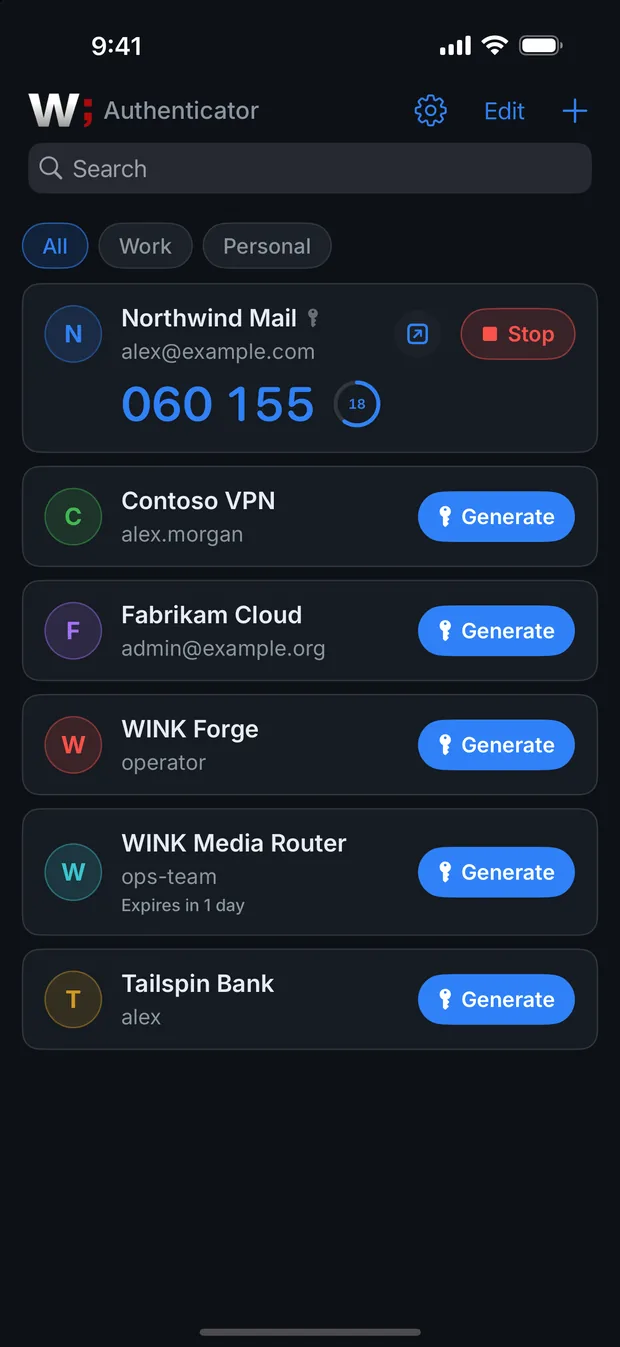
This app keeps them hidden. Each account sits in the list as a name and a username with a Generate button beside it. Tap Generate and that one code appears with its countdown ring; tap Stop and it is hidden again. Nothing else on the screen is ever showing a live code.
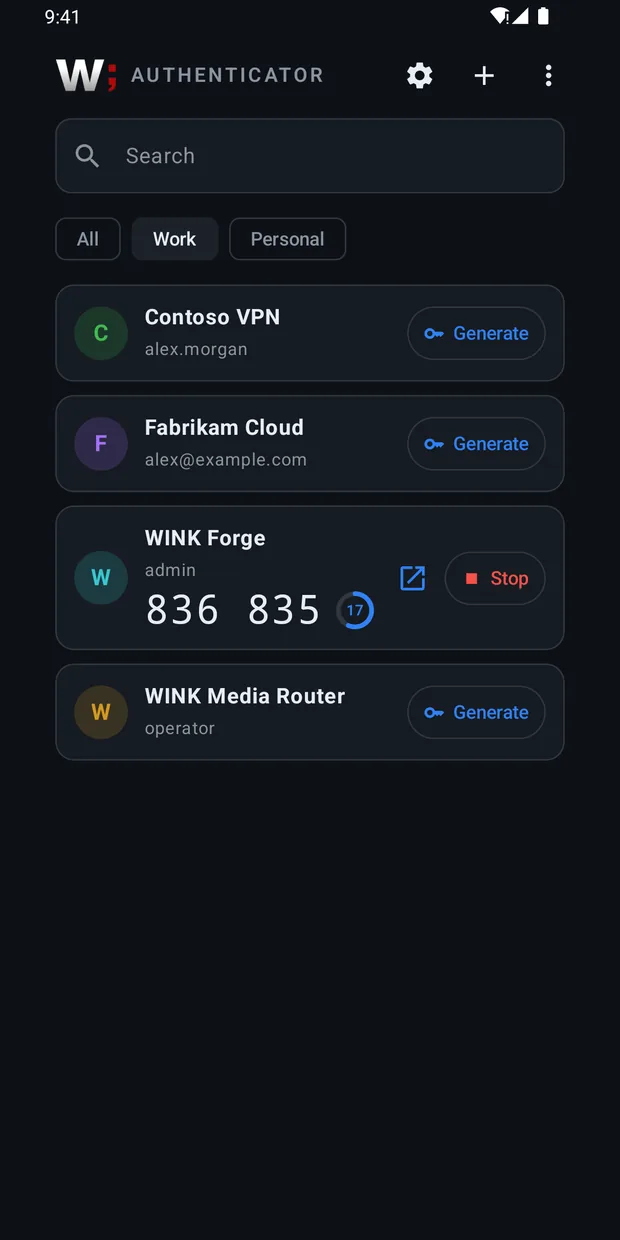
The accounts themselves are searchable, and they can be grouped as Work or Personal and filtered with one tap, which is the difference between a tidy list and scrolling past your bank to find the VPN.
The Work filter, on Android. Sample accounts, not real ones.
Four ways in, because the QR code is not always on a screen you can point a camera at.
Point the camera at the code the site or system displays. The camera is used for this and for receiving a transfer from another device, and for nothing else.
For a QR code that arrived as a screenshot or a photograph, which is the usual case when the setup page was open on the same phone.
Every site that shows a QR code also offers the key as text. Useful when the code will not scan, or when the setup page is on a machine with no screen you can see.
A standard otpauth:// link on the clipboard is recognised and added directly.
Accounts already set up in another authenticator app can be brought across using that app's own export, rather than being added again one at a time from each website.
This is where authenticator apps usually hurt, so it is where most of the work went.
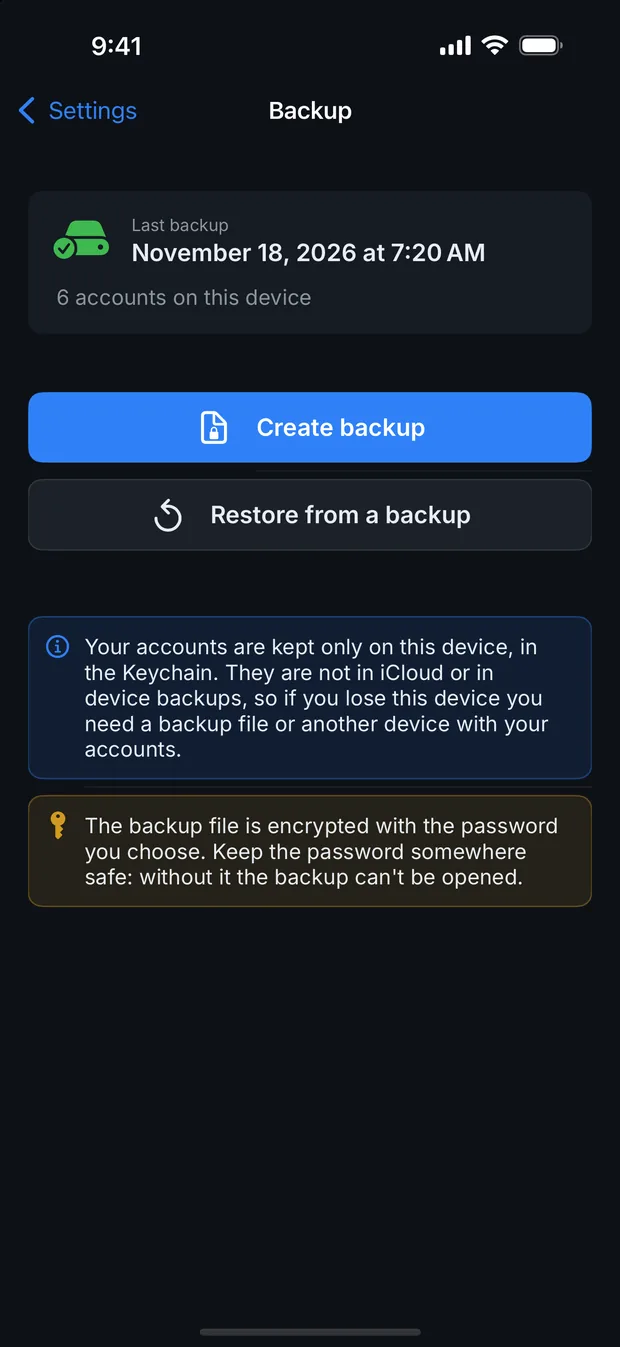
Your keys are not in iCloud and not in a device backup, which is the right default and also the reason a lost phone is such a problem. The app answers that with two deliberate routes off the device and a record of where it has sent things.
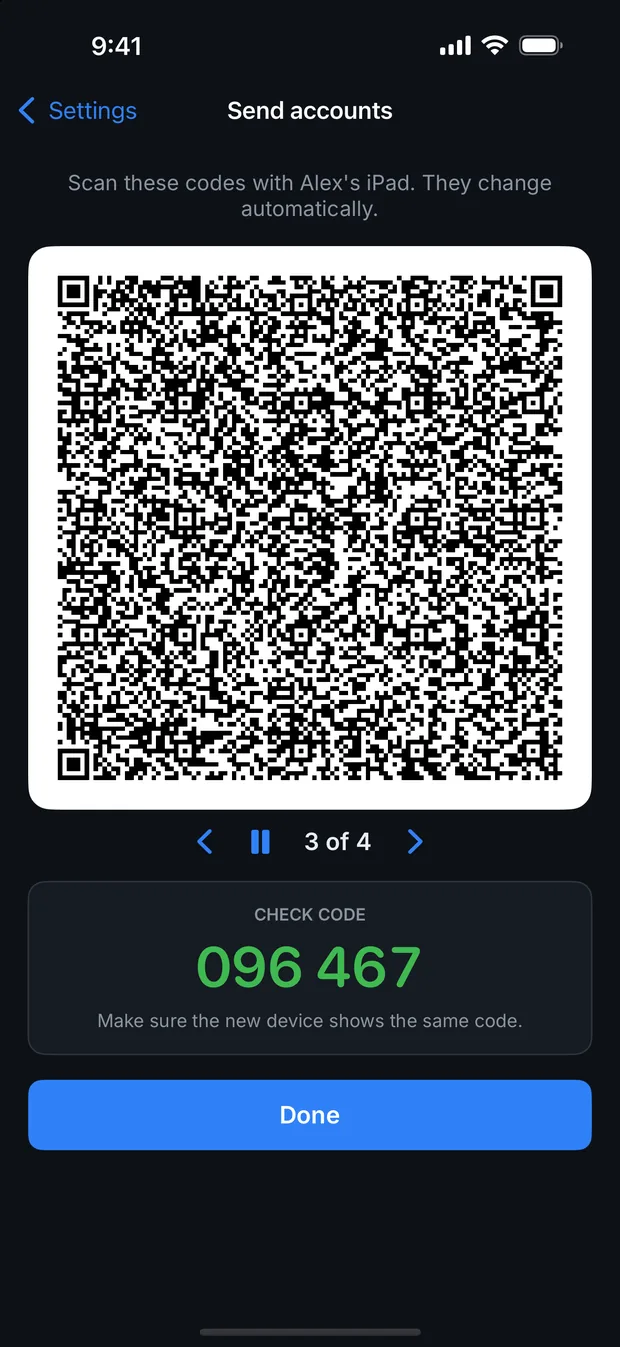
The old device plays a short sequence of QR codes and the new one reads them with its camera. Both ends show the same check number, so you can see that the thing you are copying to is the device in your other hand. Nothing travels over a network, which means it works between an iPhone, an iPad and an Android device, and it works in a building with no signal.
For the case where the old phone is already gone. The app writes a single encrypted file, protected with a password you choose, using AES-256. Put it wherever your organisation keeps that sort of thing. Without the password the file cannot be opened, by us or by anyone, so the password is the thing to look after.
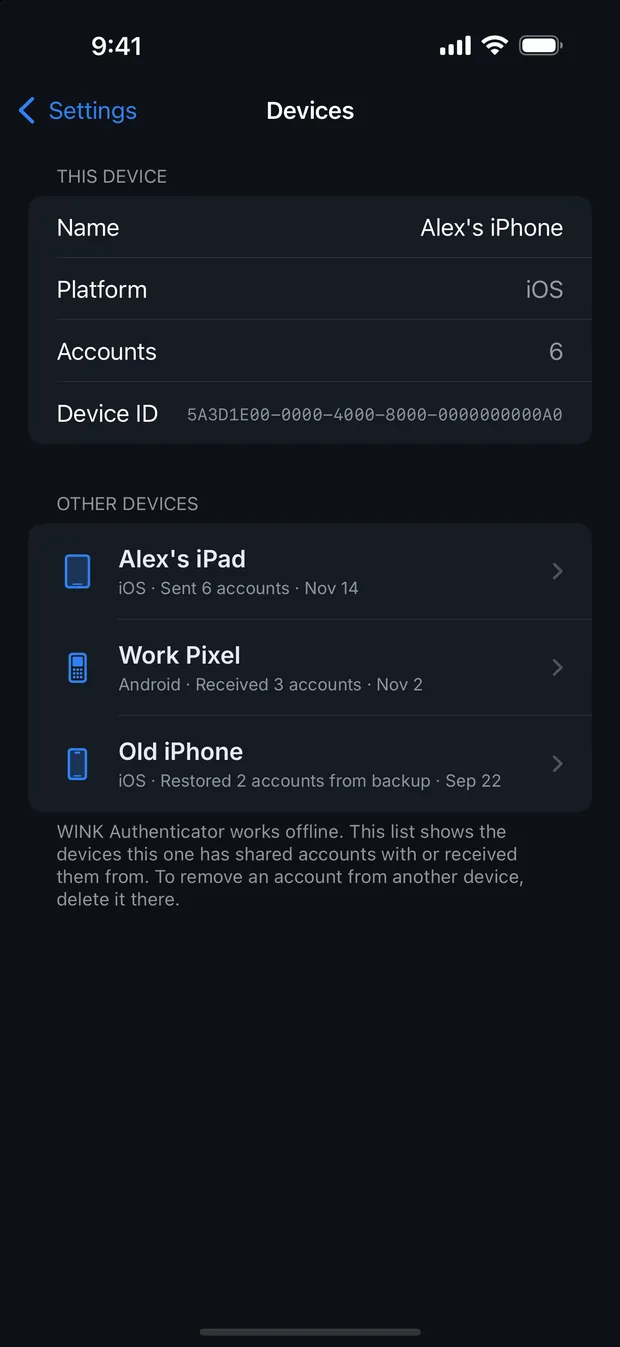
The app keeps a list of the devices it has sent accounts to or received them from, with the date and the number of accounts. It is a local record kept for your benefit rather than a management console, and the app says so on the screen: to remove an account from another device, you remove it on that device.
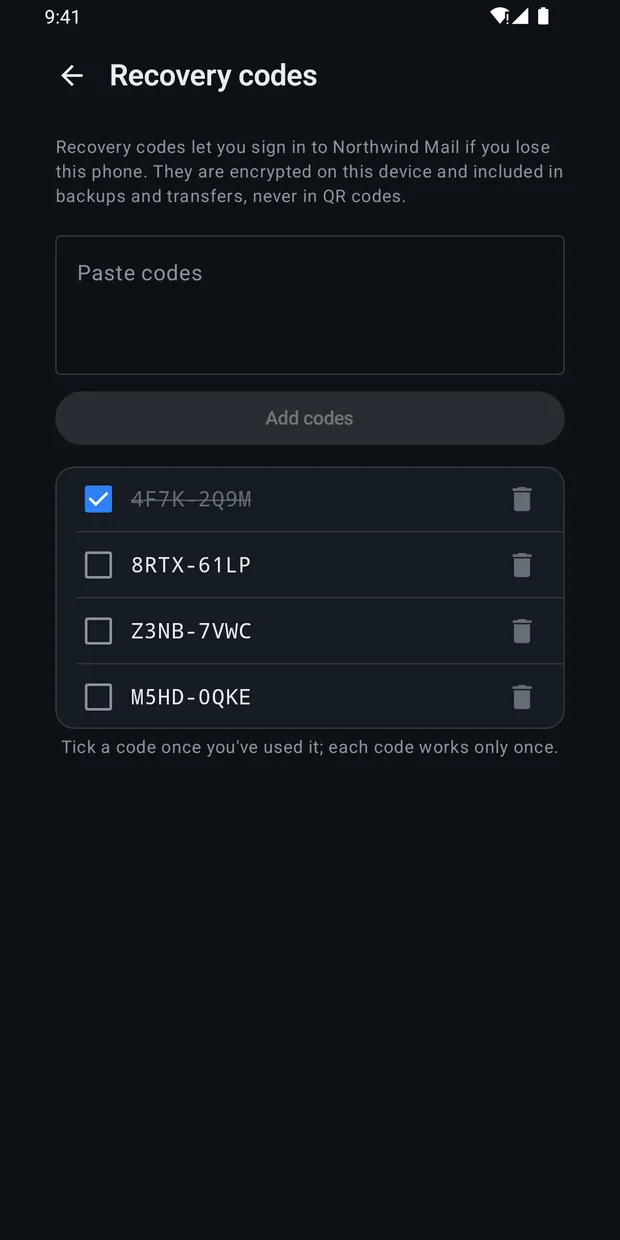
Most sites hand you a sheet of single use recovery codes when you turn two step verification on, and most people put them somewhere they will never find them again. The app will keep them with the account they belong to, encrypted on the device and behind the app lock. They travel in a backup and in a device transfer, and deliberately never in a QR code. Tick one off when you use it, because each one works only once.
An account can also be given an expiry. That is for the contractor who needs the control room login for a fortnight, or the support account issued for one job: the entry disappears from the list by itself rather than depending on somebody remembering to go back and delete it.
Recovery codes kept with their account. Sample codes.
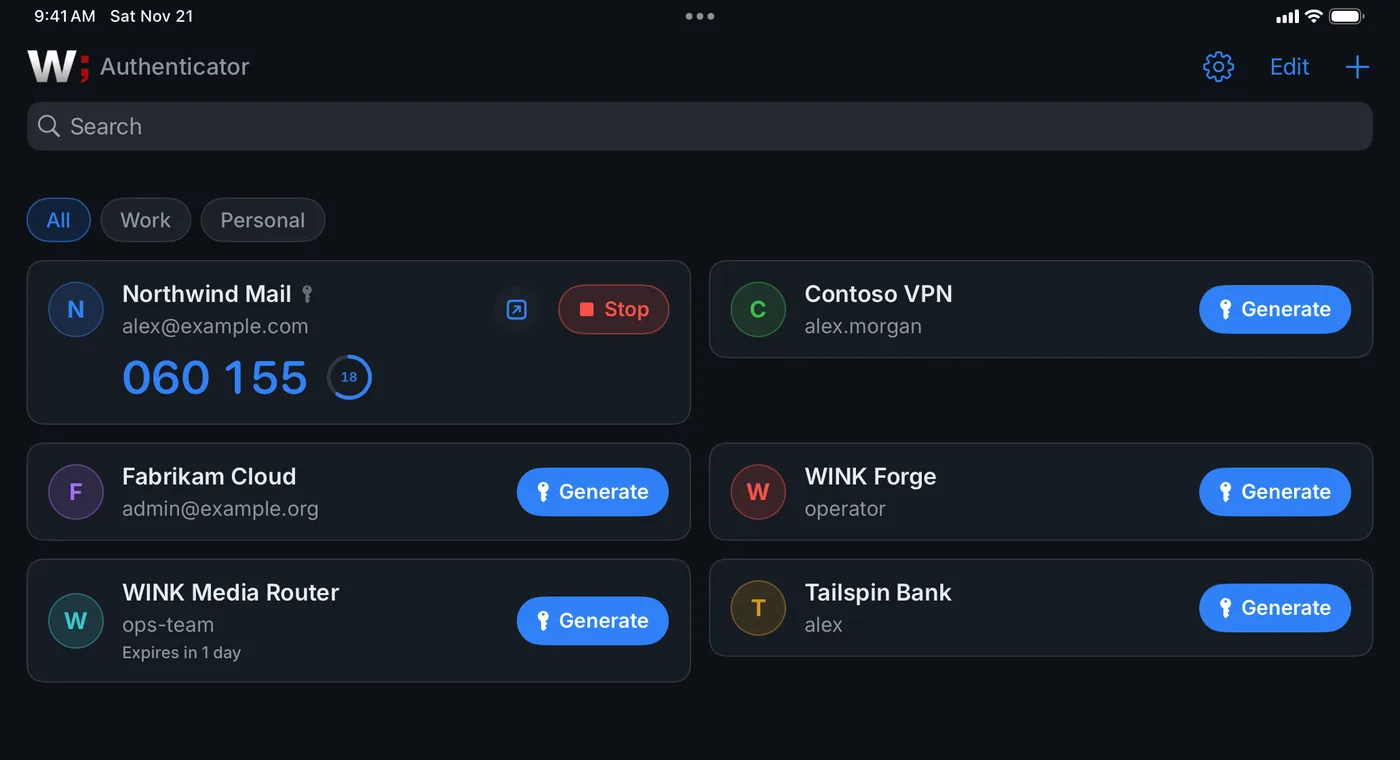
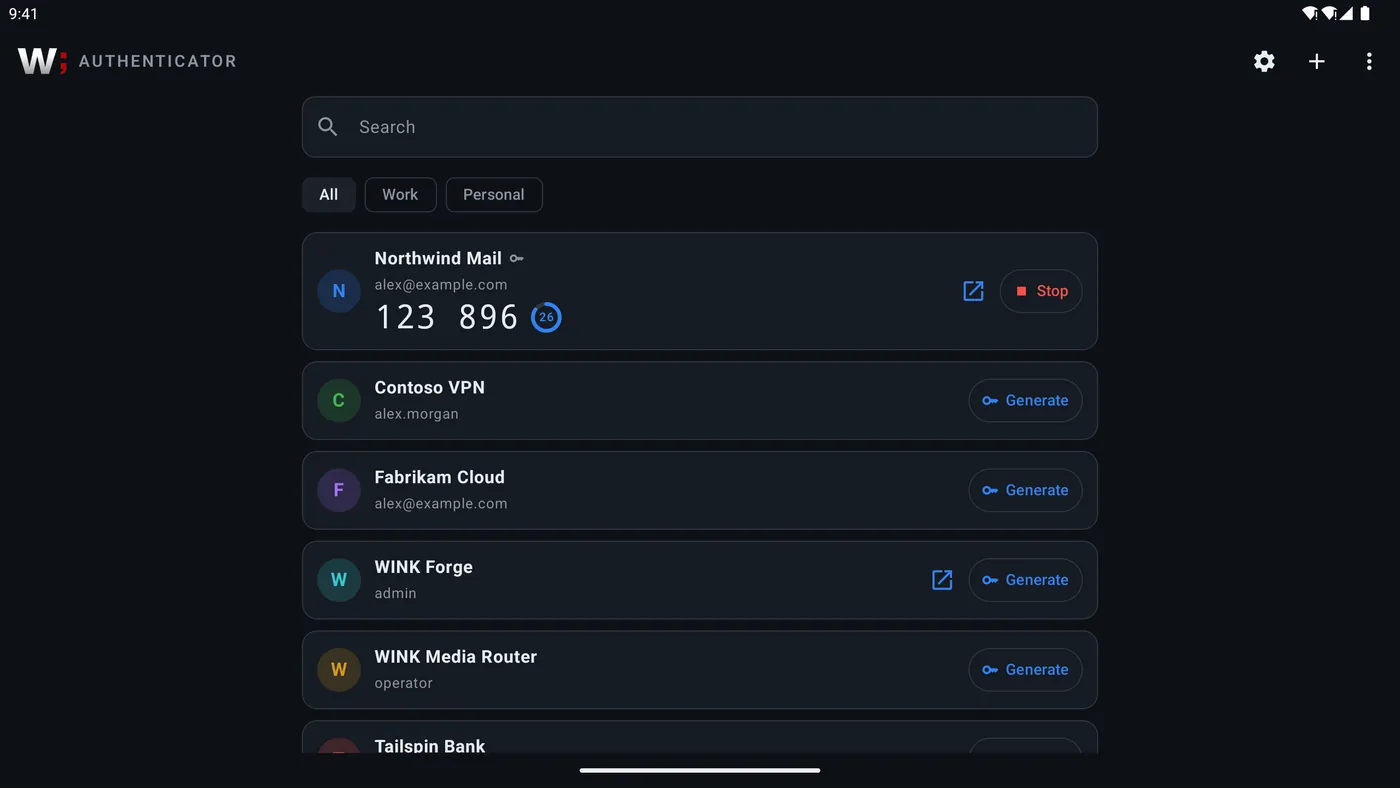
The same app, laid out for the device it is running on, which is worth having when the tablet is the thing that lives on the control room desk.
iPad, two columns.
Android tablet.
Sign-ins to WINK Forge, WINK Media Router, WINK Archiver and WINK Crossroad can take a code from this app exactly as they take one from any other authenticator, because it is the same standard. Nothing about it is proprietary and nothing locks you to it.
The reason we built our own is the deployment we see most often. A good deal of this equipment sits on a segment with no route to the internet, and a second factor that depends on a push notification, an SMS or a vendor's cloud service is no second factor at all on that network. A code computed on the phone in the operator's hand works there, and keeps working when the link to the outside is down.
Three things are being built into the appliances themselves and are described here so you know they are on the way. None of them is available today.
Until those ship, the app is used the ordinary way: scan the QR code the system shows, and type the six digit code when you sign in.
The short answers, for the person who has to approve this onto a managed device.
| Where the keys live | In the device's own secure storage, which is the iOS Keychain or Android encrypted storage. They are not copied to iCloud, to a Google account or into an operating system device backup. They leave the device only when you create a backup file or run a transfer yourself. |
|---|---|
| Network use | Generating a code needs none. Codes are computed on the device from the key and the clock, with no sync service and no account with WINK. The only network traffic the application produces at all is the crash report described below. |
| Accounts and sign-up | There is no sign-up screen and no account to create. Nothing identifies you to us. |
| Backup file | A single file encrypted with AES-256 under a password you choose, written where you put it. The password is not stored and is not recoverable, so a lost password means a lost backup. |
| Device to device transfer | Encrypted, carried over the camera as a sequence of QR codes rather than over a network, and confirmed by a check number shown on both devices. Recovery codes are included in a transfer; they are never placed in a QR code shown for any other purpose. |
| App lock and biometrics | An optional lock using Face ID, Touch ID or a fingerprint, evaluated by the operating system. The app receives a yes or a no and never receives biometric data, which does not leave the device. |
| Camera | Used to scan a QR code when adding an account or receiving a transfer, and for nothing else. No photographs are kept and nothing is uploaded. |
| Data sent to WINK | Anonymous crash reports only, through Sentry (operated by Functional Software, Inc.), kept for 90 days. Errors only: no performance tracing, no session replay, no screenshots and no view hierarchy, no user identifier and no personal data. Every report passes a filter that discards the whole event if it contains a setup link, a secret or anything shaped like a key, so account names, issuers, setup keys, generated codes and recovery codes cannot reach us even in a fault. |
| Android permissions | INTERNET for the crash report, CAMERA for scanning a QR code, and USE_BIOMETRIC with USE_FINGERPRINT for the app lock on older releases. Nothing else: no location, no microphone, no contacts, no SMS, no call log and no advertising ID. The camera is declared as not required, so the application still installs on a device that has none. |
| Tracking and advertising | None. No advertising, no analytics, attribution or profiling software, no location, and no advertising identifier used or declared. |
| Distribution and cost | The public App Store and Google Play, free, with no in-app purchases and no paid tier. |
Our privacy policy covers this in full. If your information security process has its own questionnaire, send it to service@wink.co and we will complete it against the current build rather than against a datasheet.
There is a full manual, and there is a person on the other end of an email address.
Fourteen sections covering everything the application does: adding an account four different ways, getting a code, recovery codes, expiring access, moving to a new phone, backups, importing from another authenticator app, and a troubleshooting table for when a site says your code is wrong.
Write to service@wink.co with what you are seeing and which device you are on. If you are evaluating the application for an organisation and have a security questionnaire to complete, send that to the same address and we will answer it against the current build.
There is no account with us, so there is nothing we can look up about you, and nothing we can reset on your behalf.
No. Codes are produced on the device itself, so it works in airplane mode, on an isolated network and with no signal at all. The only thing it ever sends is an anonymous crash report if it crashes.
Any site or system that offers codes from an authenticator app, which is nearly all of them. It uses the open TOTP and HOTP standards, so nothing about it is proprietary. It also covers sign-ins to WINK Forge, WINK Media Router, WINK Archiver and WINK Crossroad.
It is free, with no advertising, no in-app purchases and no paid tier. There is no sign-up screen and no account with us, and nothing in the application identifies you to us.
No. Producing a code needs no network. The only thing the application sends is an anonymous crash report, and every report passes a filter that discards it entirely if it contains anything shaped like an account key, so account names, setup keys, generated codes and recovery codes cannot reach us even in a fault. Our privacy policy section 7 is the full statement.
No, and that is worth understanding before you need it. We never hold a copy of your keys, so there is nothing for us to give back. What works is restoring a backup file on a new device, using another device you had already transferred to, or using the recovery codes each website issued you. All three have to be set up beforehand, which is why the manual says to make a backup on the first day.
Either by an encrypted phone to phone transfer, where the old device shows a short sequence of QR codes that the new one reads with its camera and both display a matching check number, or by restoring a password protected backup file. The transfer uses no network and works between iPhone, iPad and Android. The manual walks through it step by step.
No, deliberately. The keys stay in the device's own secure storage and are kept out of operating system backups, so that getting into somebody's cloud account does not also hand over their second factor. The trade is that a backup file or a transfer is the only way to move them.
Only to read QR codes, when you add an account or receive a transfer. No photographs are kept and nothing is uploaded. On Android the camera is declared as not required, so the application still installs on a device that has none.
Both. Apps that can export in the Google Authenticator format are imported by scanning their export codes. Apps with no export are handled with a guided checklist that sets each account up again and keeps your place. Accounts can also be sent back out as QR codes most authenticator apps can scan, because being able to leave is part of not locking you in.
Not for other companies' services, because those are tied to their own applications by design. For WINK systems, one tap approval by QR code is planned alongside appliance updates and is not available yet.
More in the manual's questions and answers, which covers organising accounts, counter based codes, forgotten backup passwords and what administrators can expect.
WINK Authenticator sits apart from our other applications: it is a general purpose tool rather than a client of a WINK system, and it is useful whether or not you own anything else of ours. The companion apps for the video platform are listed on WINK Mobile Apps, and the platform itself is on Products.
No account, no advertising and no paid tier. Your accounts and the keys behind them never leave the device unless you move them yourself.
Coming to the App Store and Google Play. Questions in the meantime go to service@wink.co.